GoHighLevel AI Features: Every Tool You Get in 2026
10 min read · Updated April 2026
What AI features does GoHighLevel have?
GoHighLevel includes Conversation AI for automated lead responses, AI Voice Agents for phone calls, AI-powered content generation for emails and social posts, workflow AI actions for intelligent routing and scoring, and AI-assisted funnel and website building. These features are available on all plans with usage-based pricing for AI actions.
What AI features are available in GoHighLevel?
GoHighLevel has invested heavily in AI since late 2024. The platform now includes AI capabilities across nearly every feature: conversations, voice, content, workflows, and building. This guide covers each one in detail so you know exactly what is available and how to use it.
For context on the full platform, see our comprehensive GoHighLevel review.
Conversation AI
Conversation AI is GoHighLevel's flagship AI feature. It handles lead responses automatically across SMS, email, Facebook Messenger, Instagram DM, and Google Business Messages.
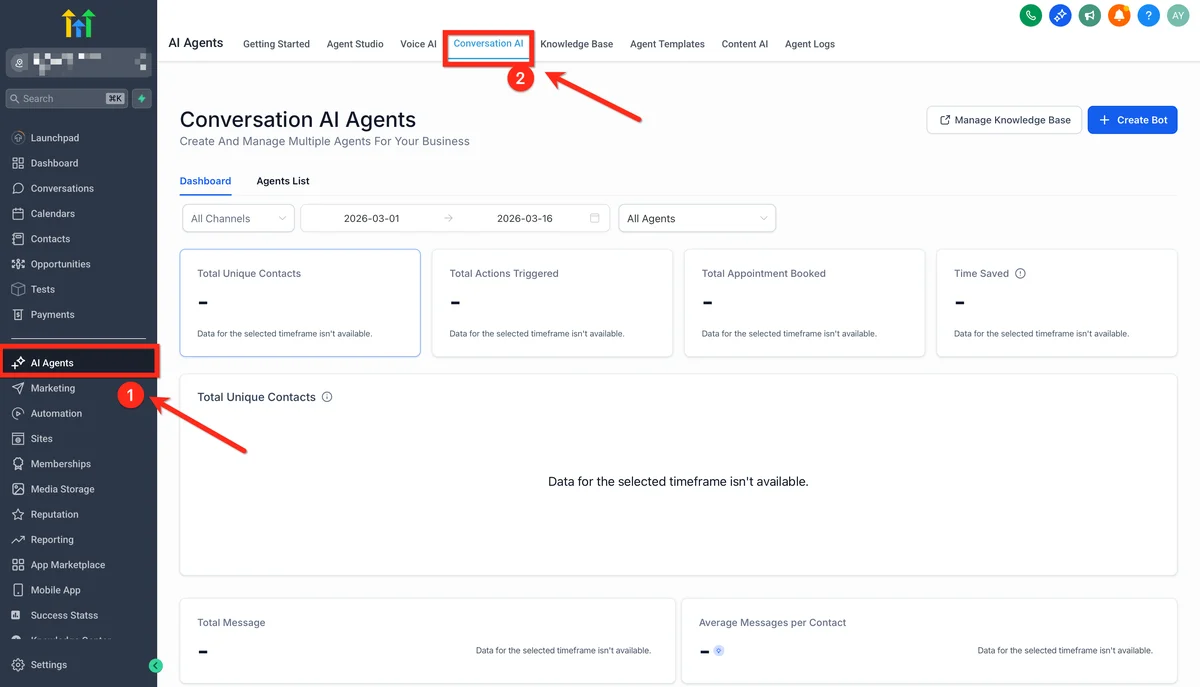
How Conversation AI works
When a lead sends a message, Conversation AI analyses the context, checks your business information and custom training data, and generates a contextually appropriate response. It can answer questions about your services, qualify leads by asking follow-up questions, book appointments directly in your calendar, and hand off to a human when the conversation requires it.
The AI uses your business context to respond accurately. You train it by providing information about your services, pricing, hours, FAQs, and any custom instructions. The more context you give it, the better it performs.
Setting up Conversation AI
- Navigate to Settings then AI in your GoHighLevel account
- Enable Conversation AI for the channels you want (SMS, email, web chat, social)
- Add your business information and training content
- Set up escalation rules for when the AI should hand off to a human
- Define operating hours and response behaviour
- Test with sample conversations before going live
Conversation AI pricing
Conversation AI uses a credit system. Each AI response costs credits, and pricing varies by channel and response complexity. Most agencies report spending $20-$50/month on AI credits for moderate lead volumes. The ROI is significant when you consider that response speed is one of the biggest factors in lead conversion.
For a detailed walkthrough, read our dedicated Conversation AI guide.
EXTENDED FREE TRIAL
Start with 30 days free, not 14.
Use our partner link to get double the standard 14-day trial.
Start Your Free 30-Day Trial →AI Voice Agents
AI Voice Agents let you automate inbound and outbound phone calls using AI-powered voice technology. This is one of GoHighLevel's most impressive features.
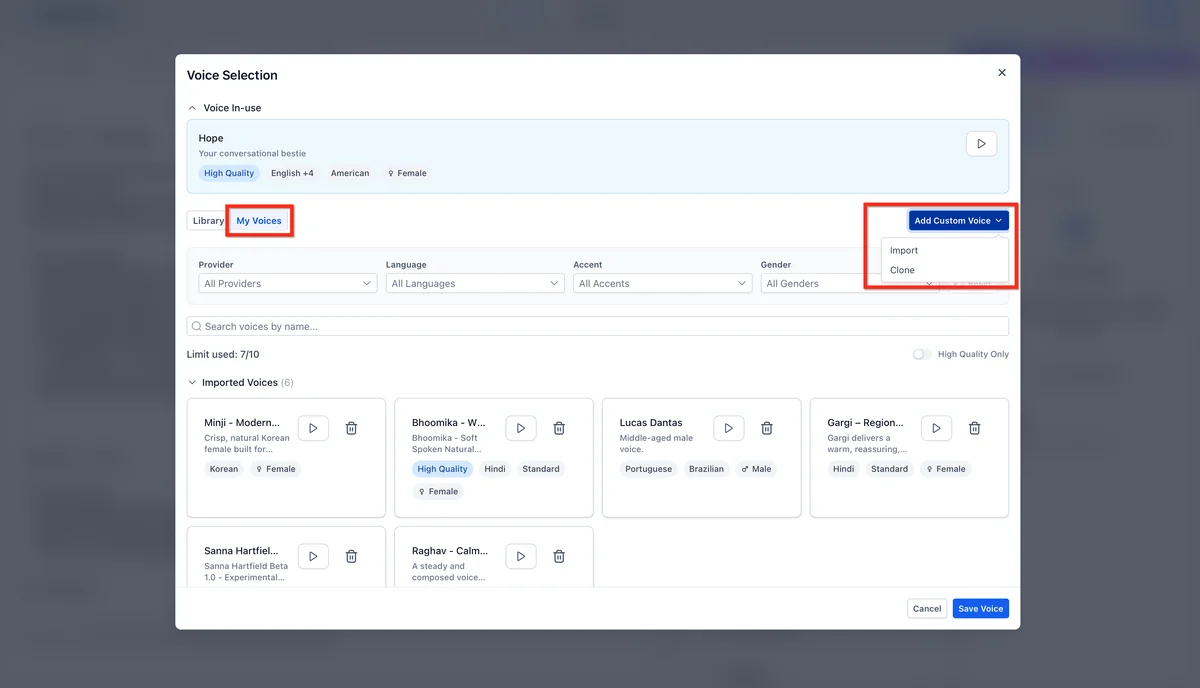
What AI Voice Agents can do
AI Voice Agents handle real phone conversations. They can answer inbound calls and route them based on caller intent, make outbound calls for appointment reminders and follow-ups, qualify leads over the phone using natural conversation, book appointments during the call, and transfer to a human agent when needed.
The voice quality has improved dramatically. Most callers cannot tell they are speaking with AI, especially for structured conversations like appointment booking and qualification.
Voice Agent configuration
You configure Voice Agents with a persona (name, personality, speaking style), a knowledge base (your business information), call objectives (what the agent should try to accomplish), and escalation triggers (when to transfer to a human).
Voice Agents integrate directly with GoHighLevel's automation workflows, so a completed call can trigger follow-up emails, SMS messages, or pipeline stage changes.
For a complete setup tutorial, see our AI Voice Agent guide. For the latest 2026 updates including GPT-5 Mini and sub-600ms latency, see our updated Voice AI guide.
Agent Studio
Agent Studio is GoHighLevel's visual builder for creating custom AI agents. Using a drag-and-drop canvas, you design multi-step AI workflows that can qualify leads, book appointments, answer support questions, and take CRM actions autonomously. Agents connect to knowledge bases, web search, and third-party APIs. It's available on all plans under AI Employee Plus billing. For a complete walkthrough, see our Agent Studio tutorial.
MCP Server (Developer Integration)
The GoHighLevel MCP Server enables external AI agents. Claude, GPT, or any MCP-compatible model. To read and write CRM data directly. This is aimed at developers and agencies building custom AI solutions on top of GoHighLevel. See our MCP Server guide for setup instructions and available tools.
AI Content Generation
GoHighLevel includes AI content generation across several areas of the platform.
Email content AI
The email builder includes an AI assistant that can write subject lines, email body copy, and calls to action. You provide a brief description of what you want, and the AI generates draft content that you can edit before sending.
This works well for follow-up sequences, newsletter drafts, and re-engagement campaigns. It saves time on first drafts but still benefits from human editing for tone and accuracy.
Social media AI
The social planner includes AI generation for social media posts. It can create posts for Facebook, Instagram, and Google Business Profile based on your topic and desired tone. It also suggests hashtags and optimal posting times.
Funnel and website AI
GoHighLevel's funnel builder includes AI-assisted page generation. Describe what you want, and the AI creates a first draft of your landing page or funnel step. This is useful for getting started quickly, though most agencies refine the output significantly.
FREE TRIAL
Get 30 Days Free With Our Partner Link
- ✓Full access for 30 days
- ✓No charge during the trial
- ✓Cancel any time
Join 2.2 million businesses already running on GoHighLevel
Workflow AI Actions
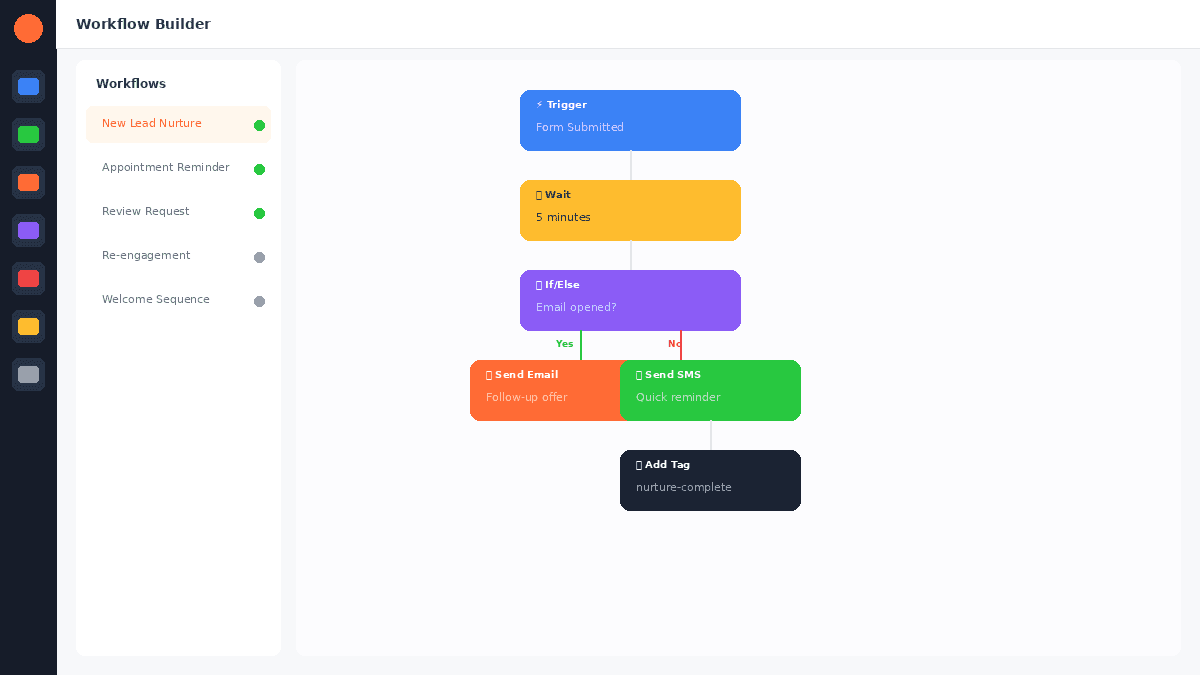
GoHighLevel's workflow builder includes AI-powered actions that you can add to any automation sequence.
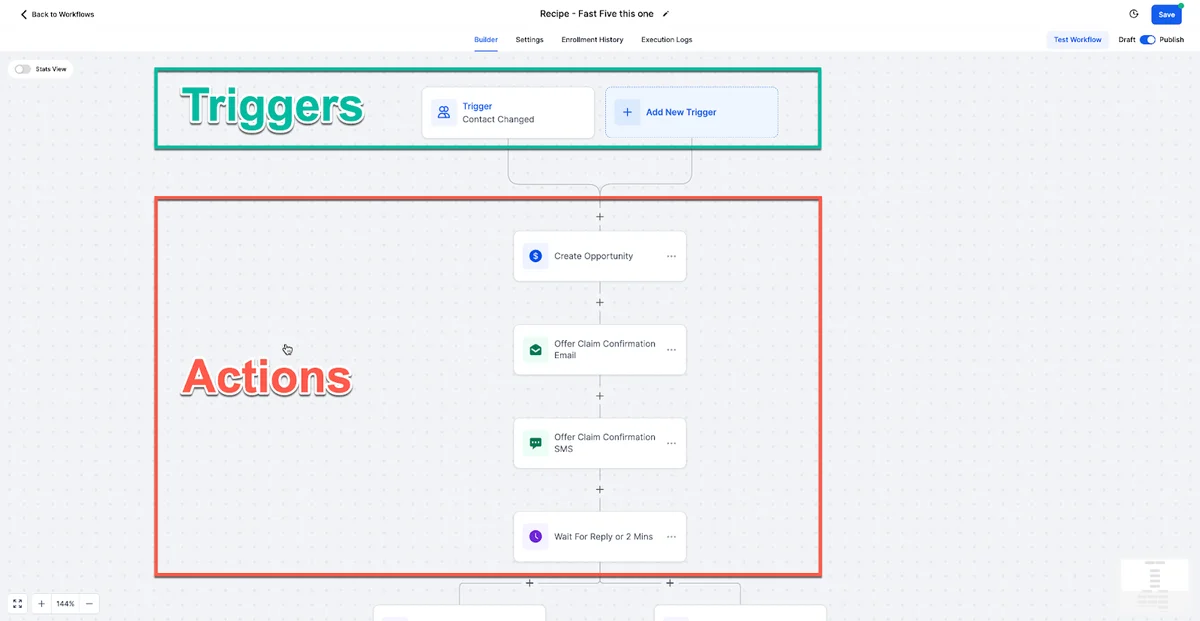
AI response action
Add an AI response step to any workflow to generate contextual replies. The AI analyses the trigger data and conversation history, then crafts a response. This is useful for personalised follow-ups that feel human-written.
AI lead scoring
Use AI to score leads based on their behaviour, conversation content, and engagement patterns. The AI assigns a score that you can use to route leads to different pipeline stages or trigger different follow-up sequences.
AI intent detection
AI intent detection analyses incoming messages and categorises them by intent: interested, objection, question, complaint, or booking request. You can use these categories as conditional branches in your workflows.
AI summarisation
For longer conversation threads, AI summarisation creates a brief summary of the conversation so far. This is valuable for human agents who need to pick up a conversation that the AI has been handling.
Learn how to build workflows with these AI actions in our automation workflows guide.
AI-Assisted Building
AI funnel builder
Describe your offer, target audience, and desired outcome, and GoHighLevel's AI generates a complete funnel with landing page, thank you page, and basic copy. It is a solid starting point that saves 30-60 minutes of setup time.
AI website builder
Similar to the funnel builder, the AI website builder creates multi-page websites from a text description. It handles layout, copy, and basic styling. Agencies typically use this for quick client site drafts.
How much do AI features cost?
GoHighLevel AI features use a credit-based system layered on top of your subscription:
| Feature | Approximate Cost |
|---|---|
| Conversation AI response | $0.01-0.03 per message |
| Voice Agent (inbound) | $0.07-0.15 per minute |
| Voice Agent (outbound) | $0.10-0.20 per minute |
| Content generation | $0.01-0.05 per generation |
| Workflow AI actions | $0.01-0.03 per action |
Costs vary based on complexity and volume. Most agencies spending $30-$100/month on AI credits report saving 10-20 hours of manual work. For predictable billing, the AI Employee unlimited plan gives you unmetered access to core AI features for $97/month per sub-account. For pricing details on the base subscription, see our pricing guide.
Which AI features should you use first?
For most agencies, the highest-ROI AI features are:
-
Conversation AI for lead response. Speed to lead is the biggest factor in conversion. Automating initial responses means leads get answered in seconds instead of hours.
-
Workflow AI actions for lead scoring. Automatically prioritising leads saves your sales team time and improves close rates.
-
AI content generation for email sequences. Generating first drafts of follow-up sequences is faster than writing from scratch.
-
Voice Agents for appointment reminders. Reducing no-shows directly improves revenue.
-
Ask AI scheduled tasks for recurring work. Set up recurring AI prompts that run daily or weekly. Content drafts, lead summaries, reporting. Without building workflows.
If you are considering GoHighLevel specifically for its AI capabilities, our GoHighLevel vs HubSpot AI comparison covers how GHL's AI stacks up against HubSpot's.
For additional context, see GoHighLevel's official AI documentation.
For additional context, see AI in marketing automation research from McKinsey.
👍 GoHighLevel Pros
- ✓AI features integrated natively across the platform
- ✓Conversation AI handles multiple channels simultaneously
- ✓Voice Agents are genuinely impressive for structured calls
- ✓Workflow AI actions add intelligence to any automation
- ✓Pay-per-use pricing means you only pay for what you use
- ✓All AI features available on every subscription plan
👎 Cons
- ✗AI credit costs can add up at high volumes
- ✗Voice Agent quality varies for complex or emotional conversations
- ✗Content generation needs human editing for quality
- ✗AI training requires upfront time investment
- ✗Some AI features are still maturing
Frequently Asked Questions
Are GoHighLevel AI features included in all plans?
Can Conversation AI book appointments?
How accurate is Conversation AI?
Can I use GoHighLevel AI Voice Agents for cold calling?
Does GoHighLevel AI work in languages other than English?
You can try all GoHighLevel AI features free for 30 days with the extended trial.
For the 30-day free trial (double the standard 14 days), see our GoHighLevel free trial guide.
Related Articles
- GoHighLevel AI: Complete Independent Guide
- GoHighLevel AI Voice Agent
- GoHighLevel Conversation AI
- GoHighLevel Automation Workflows
EXTENDED FREE TRIAL
Start with 30 days free, not 14.
Use our partner link to get double the standard 14-day trial.
Start Your Free 30-Day Trial →Ashley Kemp is a digital entrepreneur and perpetual traveller. Switched from ClickFunnels to GoHighLevel years ago and never looked back. Writing about what actually works.
Was this article helpful?