GoHighLevel Forms & Surveys: Build & Automate
19 min read · Updated April 2026
Does GoHighLevel have a form and survey builder?
Yes. GoHighLevel includes a fully-featured drag-and-drop form and survey builder on every plan. It supports multi-step forms, conditional logic, file uploads, e-signatures, custom styling, spam protection, and direct GoHighLevel automations triggers. GoHighLevel forms replace third-party tools like Typeform, Gravity Forms, and Formstack - saving agencies $25–$100 per month.
TL;DR
- GoHighLevel includes a powerful form and survey builder natively - no integrations required.
- Forms handle lead capture and opt-ins; surveys handle multi-step qualification, intake, and quiz funnels with conditional logic and scoring.
- Every submission can instantly trigger a CRM update, a workflow automation, an email/SMS confirmation, and a pipeline stage assignment - all without a single Zapier step.
EXTENDED FREE TRIAL
Start with 30 days free, not 14.
Use our partner link to get double the standard 14-day trial.
Start Your Free 30-Day Trial →GoHighLevel Forms vs Surveys: What's the Difference?
GoHighLevel gives you two distinct tools in the same builder: Forms and Surveys. They share the same drag-and-drop interface but serve different purposes. Understanding the distinction helps you choose the right tool for each use case.
GoHighLevel Forms
Forms are designed for quick, single-page lead capture. They are typically short - a name, email, phone number, and maybe one qualifying question - and are embedded on landing pages, funnels, or external websites. The goal is minimal friction: get the GoHighLevel CRM into your CRM as fast as possible.
Common form use cases include:
- Contact and inquiry forms
- Opt-in forms for lead magnets and free offers
- Newsletter sign-ups
- Event registration
- Quote request forms
GoHighLevel Surveys
Surveys are designed for multi-page, in-depth qualification. They break questions across multiple screens, support conditional logic (show different follow-up questions based on prior answers), and can assign scores to responses for quiz GoHighLevel landing pages use cases. They are used when you need to learn more about a prospect before booking a call or routing them.
Common survey use cases include:
- Discovery and intake forms for service businesses
- Lead qualification surveys before a sales call
- Client onboarding questionnaires
- Scored quiz funnels for coaches and consultants
- Post-purchase feedback and NPS surveys
The key takeaway: when you need a fast opt-in, use a form. When you need to qualify, intake forms for law firms, or score a prospect, use a survey.
GoHighLevel Form Builder: Features
GoHighLevel's form builder covers everything you would expect from a standalone form tool - and then some, because every form is natively connected to the CRM and automation engine.
Drag-and-Drop Field Types
The form builder supports a wide range of field types out of the box:
- Text fields - single line and multi-line (textarea)
- Email and phone - with built-in format validation
- Number - for age, budget, quantity inputs
- Dropdown menus - single or multi-select
- Checkboxes and radio buttons
- Date picker - with calendar UI
- File upload - let contacts submit documents, images, or PDFs directly through the form
- E-signature - capture legally binding digital signatures, useful for intake forms and agreements
- Custom HTML - embed any HTML snippet inside the form for advanced customisation
- Hidden fields - pass UTM parameters, referral sources, or other tracking data without showing it to the user
Every field maps to a contact property in the GoHighLevel CRM, so submitted data is immediately accessible on the contact record.
Multi-Step Forms
Long forms perform better when broken into steps. GoHighLevel supports multi-step forms natively - split your fields into pages, show a progress bar, and keep each step focused on one topic. Multi-step forms consistently outperform single-page forms for conversion on longer qualification sequences.
Conditional Logic
Conditional logic is one of the most powerful features in the GHL form builder. You can show or hide any field - or an entire form step - based on the answer to a previous question. For example:
- If a contact selects "Yes, I have a budget" in a dropdown, show a budget range field.
- If they select "Other" in a service type field, show a free-text "Please describe" box.
- Hide industry-specific questions that are not relevant to the contact's selected category.
Conditional logic keeps forms short and relevant for every respondent, which improves completion rates.
Custom Styling
Every GoHighLevel form is fully customisable in appearance. You can set:
- Background colour and image
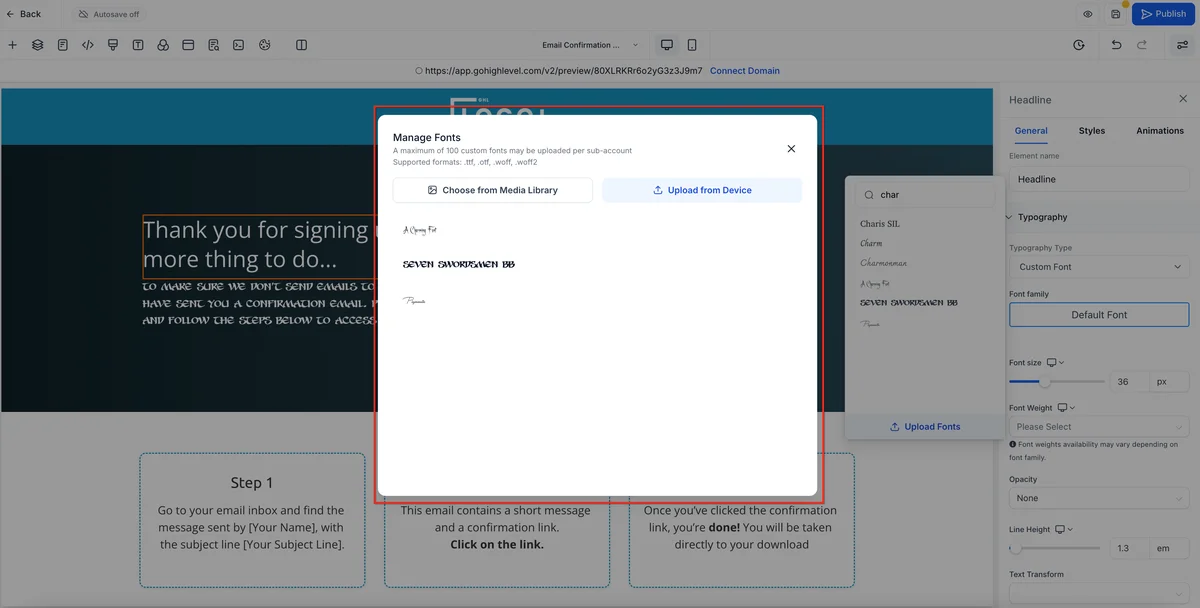
- Font family, size, and colour
- Button colour, text, and border radius
- Input field borders and spacing
- Custom CSS for pixel-perfect brand matching
This means your form looks like part of your website or funnel - not a third-party embed with its own branding.
Spam Protection
GoHighLevel forms support Google reCAPTCHA (v2 and v3) and a built-in honeypot field to filter out spam submissions before they pollute your CRM.
Submission Actions
After a form is submitted, you choose what happens next:
- Show a confirmation message - display a thank-you message directly on the page
- Redirect to a URL - send the contact to a thank-you page, booking page, or upsell
These submission actions work independently of your automation workflows - the redirect or confirmation message fires immediately, while the workflow processes in the background.
Auto-Populate Fields for Returning Contacts
If a contact visits a form page while already in your system (tracked via cookie), GoHighLevel can auto-populate their known fields - name, email, phone - so they do not have to retype information they have already provided. This is particularly useful for multi-step intake processes.
GoHighLevel Survey Builder: Features
The survey builder shares the same drag-and-drop field palette as the form builder, but adds features tailored for longer, more complex data collection.
Multi-Page Surveys
Surveys are structured as multiple pages rather than one continuous form. Each page can have its own title, description, and set of questions. Contacts click "Next" to advance through the survey, and a progress indicator keeps them oriented.
Conditional Page Logic
Beyond field-level conditional logic, GoHighLevel surveys support page-level branching. Based on an answer on page one, you can skip the contact ahead to page three, loop them back, or route them to an entirely different set of questions. This enables true branching paths that adapt to each respondent's situation.
Survey Scoring / Quiz Mode
Each answer option in a survey can be assigned a numeric score. GoHighLevel totals these scores at the end of the survey and makes the total available as a merge field and CRM data point. This is the foundation of quiz funnels - explained in detail later in this guide.
Partial Submission Capture
Unlike many third-party form tools, GoHighLevel can capture partial survey submissions. If a contact completes the first two pages of a five-page survey and then abandons it, their data is still saved to the CRM. You can trigger a follow-up automation to re-engage them and encourage completion - recovering leads that would otherwise be lost entirely.
How to Build a GoHighLevel Form (Step-by-Step)
This walkthrough covers creating a lead capture form, applying conditional logic, and connecting it to a workflow.
Step 1: Create a new form
Navigate to Sites → Forms → Builder in your GoHighLevel account. Click Add Form, give it a name (used for internal reference only), and choose whether to start from a blank form or a template.
Step 2: Add fields
Drag fields from the left panel onto the form canvas. Start with the essentials - typically First Name, Last Name, Email, and Phone. Add any qualifying fields your sales team needs. Use the field settings panel on the right to set labels, placeholder text, and whether each field is required.
Step 3: Set conditional logic
Click the conditional logic icon on any field. Define your rules: choose a trigger field, select a condition (equals, contains, does not equal), enter the value, and choose whether to show or hide the target field when the condition is met. You can stack multiple conditions using AND / OR logic.
Step 4: Customise the design
Click the Styles tab at the top of the builder. Set your background, button colour, font, and any custom CSS. Preview the form at different screen sizes to verify mobile responsiveness.
Step 5: Set the submission action
Under Options, choose whether to show a confirmation message or redirect to a URL after submission. Write your confirmation message or paste in your thank-you page URL.
Step 6: Get the embed code or shareable link
Click Integrate to access the embed options:
- Inline embed code - paste a JavaScript snippet into any web page to render the form inline
- iFrame embed - embed via iFrame for simpler hosting environments
- Hosted link - share a direct URL to the form hosted on GoHighLevel's servers, with no website needed
Step 7: Connect to an automation workflow
In your GoHighLevel Workflows, create a new workflow and set the trigger to Form Submitted. Select your form from the dropdown. Now every submission activates the workflow - adding the contact to the CRM, tagging them, sending a confirmation, notifying your team, and moving them into the right pipeline stage.
Embedding GoHighLevel Forms
On GoHighLevel Landing Pages (Native)
If you are using GoHighLevel's funnel or website builder, embedding a form is a single drag-and-drop action. Add the Form element to any page section, then select which form to display from a dropdown. The form renders natively - no copy-pasting of embed codes.
On External Websites
For forms embedded on WordPress, Webflow, Squarespace, Wix, or any other platform, GoHighLevel provides two embed options:
Inline embed code: A JavaScript snippet that renders the form directly in the page at the position of the snippet. This method respects the page's CSS context and gives the cleanest visual result.
iFrame embed: A standard iFrame that loads the form in an isolated environment. Slightly easier to implement in restricted page editors that do not allow custom JavaScript.
Both methods pass submission data directly to your GoHighLevel account. There is no intermediate service, no Zapier connection, and no webhook setup required.
Facebook Lead Ads Integration
GoHighLevel integrates directly with Facebook Lead Ads. Submissions from your Facebook Lead Ad forms are pulled into GoHighLevel automatically, creating contacts and triggering workflows just like a native GHL form submission. This means your Facebook leads receive the same instant follow-up automation as your website leads - no delays, no manual imports.
GoHighLevel Form Automations: What Happens After Submit
The reason GoHighLevel forms are genuinely more powerful than standalone tools like Typeform is what happens the moment a form is submitted.
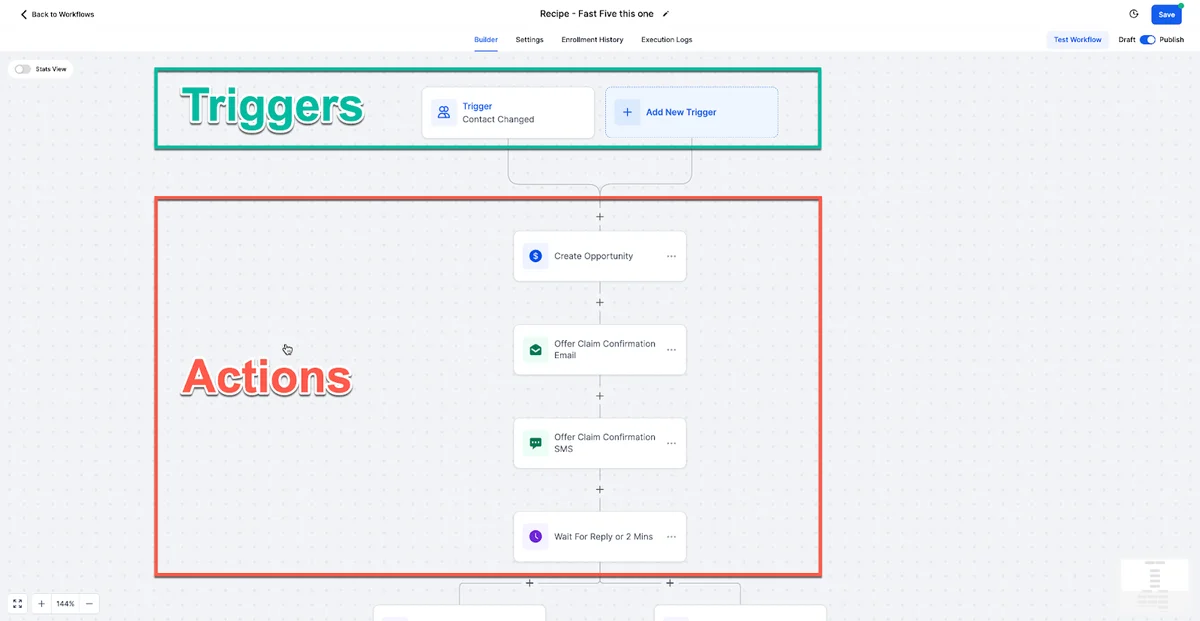
Trigger a Workflow
Every form submission can fire a GoHighLevel workflow. This workflow is a full automation sequence with branches, delays, conditions, and actions. A single form submission can trigger a sequence that runs for days, weeks, or months.
Auto-Add to CRM and Tag
The contact is created (or updated, if they already exist) in the GoHighLevel CRM instantly. You can automatically apply contact tags based on the form submitted or the answers given - for example, tagging a contact as "Interested: SEO" if they selected SEO as their primary need.
Assign to Pipeline Stage
Workflows triggered by form submissions can add the contact to a specific CRM pipeline and move them to a designated stage. A lead capture form submission might create a deal at the "New Lead" stage; a qualification survey submission might move that deal forward to "Qualified" automatically.
Send Instant Confirmation Email or SMS
A workflow triggered by form submission can send a confirmation email or SMS within seconds. This automated acknowledgment sets expectations and keeps your brand top-of-mind while the lead is still engaged.
Notify Your Sales Team
The same workflow can send an internal notification to a sales rep via email, SMS, or Slack. The notification can include the submitted form data so the rep has full context before making a follow-up call.
For a deep dive into GoHighLevel's automation capabilities, see our automation workflows guide.
GoHighLevel Quiz Funnels
Quiz funnels have become one of the most effective lead generation and qualification tools for coaches, consultants, and service businesses. GoHighLevel's survey builder is purpose-built for this use case.
How a GHL Quiz Funnel Works
- Build a multi-page survey with 5–10 questions relevant to your prospect's situation, goals, or problem. Each question has multiple-choice answers.
- Assign score values to each answer option. For example, "I have a marketing budget over $5,000/month" scores 10 points; "I am just getting started" scores 2 points.
- Capture the email on page one (or before the final results page) so you have the lead even if they drop off.
- Show a results page based on the total score. A high score might display "You're a great fit for our premium programme" with a CTA to book a call; a low score might display a free resource offer instead.
- Trigger a segmented workflow based on the score. High-score leads get an immediate call from your sales team; low-score leads enter a nurture sequence.
Why Quiz Funnels Perform
Quiz funnels outperform traditional lead capture forms for several reasons. They create engagement through interaction - people are curious about their results. They self-qualify prospects, so your sales team only calls people who are genuinely ready. And because GoHighLevel handles the scoring, segmentation, and follow-up natively, you can build a complete quiz funnel entirely inside the platform without any third-party integrations.
Popular quiz funnel examples in GHL:
- "What's Your Marketing Score?" (for digital marketing agencies)
- "Is Your Business Ready to Scale?" (for business coaches)
- "Which Programme Is Right for You?" (for online course creators)
- "How Healthy Is Your Roof?" (for roofing contractors - qualifying homeowners)
GoHighLevel vs Typeform vs Gravity Forms
| Feature | GoHighLevel Forms | Typeform | |
|---|---|---|---|
| Pricing | Included with GHL ($97/mo) | $25–$59/mo standalone | $59/yr (WordPress only) |
| Multi-step forms | ✅ Yes | ✅ Yes | ✅ Yes |
| Conditional logic | ✅ Yes | ✅ Yes (paid plans) | ✅ Yes (add-on) |
| File upload | ✅ Yes | ✅ Yes | ✅ Yes |
| E-signature field | ✅ Yes | ❌ No | ✅ Add-on ($) |
| Quiz / scoring mode | ✅ Yes | ✅ Yes | ✅ Add-on ($) |
| Partial submission capture | ✅ Yes | ❌ No (paid plan) | ✅ Add-on ($) |
| Native CRM integration | ✅ Yes (same platform) | ❌ Requires Zapier/API | ❌ Requires Zapier/API |
| Workflow automation trigger | ✅ Yes (native) | ❌ Requires Zapier | ❌ Requires Zapier |
| Pipeline stage assignment | ✅ Yes (native) | ❌ No | ❌ No |
| SMS follow-up on submit | ✅ Yes (native) | ❌ No | ❌ No |
| Custom CSS styling | ✅ Yes | ⚠️ Limited | ✅ Yes |
| Spam protection (reCAPTCHA) | ✅ Yes | ✅ Yes | ✅ Yes |
| Hosted form URL | ✅ Yes | ✅ Yes | ❌ WordPress only |
| Facebook Lead Ads sync | ✅ Yes (native) | ❌ No | ❌ No |
| Platform | All-in-one CRM + Marketing | Standalone form tool | WordPress plugin only |
The comparison above reveals the core advantage: GoHighLevel forms are not just a form tool - they are a connected component of an all-in-one platform. Typeform is a polished standalone product that requires Zapier (or a developer) to connect to your CRM. Gravity Forms only works on WordPress. GoHighLevel eliminates those dependencies entirely.
The financial case is compelling: replacing Typeform ($25–$59/month) and Gravity Forms ($59/year + add-ons at $40–$100/year) while also getting GoHighLevel's CRM, email marketing, SMS, funnels, and calendar - all at $97/month - is one of the most common reasons agencies switch to GHL.
FREE TRIAL
Get 30 Days Free With Our Partner Link
- ✓Full access for 30 days
- ✓No charge during the trial
- ✓Cancel any time
Join 2.2 million businesses already running on GoHighLevel
Advanced: Partial Submission Capture
Most form tools are binary - either a contact submits the complete form, or you get nothing. GoHighLevel's partial submission capture changes that equation.
How It Works
When a contact begins filling out a multi-step form or survey and provides their email address (typically on the first step), GoHighLevel creates or updates their contact record immediately - before they reach the final submit button. If they abandon the form midway, you still have their data.
Why It Matters
For longer qualification surveys, abandonment rates can exceed 50%. Without partial submission capture, those are lost leads. With it, you have the contact in your CRM and can trigger a re-engagement workflow: a follow-up email 30 minutes after abandonment saying "We noticed you didn't finish your application - here's the link to pick up where you left off."
This single feature can recover a meaningful percentage of leads that would otherwise be permanently lost.
How to Enable It
In the form/survey settings, enable Partial Submissions under the advanced options. Then in your workflows, create a trigger for "Survey/Form Partially Submitted" and build your re-engagement sequence from there.
Common Form Use Cases in GHL
Understanding which form type and configuration to use for each scenario will help you get the most out of GoHighLevel's form builder.
Contact and Inquiry Forms
The most straightforward use case: a simple form on your website or landing page that collects name, email, phone, and a message field. Keep these short (5 fields maximum) and connect them to a workflow that notifies your team and sends the contact an instant acknowledgment.
Lead Qualification Surveys
Place a multi-step survey at the end of a landing page or behind a lead magnet. Ask 3–5 qualifying questions about budget, timeline, business size, and goals. The survey data feeds directly into the contact record so your sales team can personalise their outreach from the first call.
Client Intake Forms
Once a prospect becomes a client, use a detailed multi-step survey to collect all the information you need to start their project. File upload fields let clients submit logos, brand assets, and reference materials. E-signature fields let them sign your intake agreement in the same form. Everything lands directly in their contact record.
Post-Purchase Feedback
Trigger a satisfaction survey automatically via workflow 7 days after a purchase or service delivery. Use rating scale questions and open-text fields to gather qualitative feedback. The results appear in the CRM and can trigger follow-up actions - like a workflow that sends a review request to contacts who rated their experience 9 or 10.
Event Registration
Build a registration form for webinars, workshops, or in-person events. Capture attendance preferences, dietary requirements, or session selections. Connect the form to a workflow that confirms registration, sends calendar invites, and delivers pre-event reminders.
Start Building Your First GoHighLevel Form
GoHighLevel's form and survey builder is genuinely one of the most underrated features in the platform. For agencies and service businesses, it replaces Typeform, Gravity Forms, Formstack, and Wufoo - saving $25 to $100 per month on tool subscriptions - while delivering something none of those tools can: native, no-code connection to your CRM, automations, and pipeline.
The combination of conditional logic, partial submission capture, quiz scoring, and direct workflow triggers makes GHL forms a serious competitive advantage for lead capture and qualification. Whether you are building a simple contact form, a detailed client intake survey, or a scored quiz funnel, everything you need is already inside your GoHighLevel account.
GoHighLevel offers a 30-day free trial - long enough to build your first form, connect it to a workflow, and see leads flowing into your CRM automatically.
Related Articles
EXTENDED FREE TRIAL
Start with 30 days free, not 14.
Use our partner link to get double the standard 14-day trial.
Start Your Free 30-Day Trial →Related Resources
- Visit the GoHighLevel official site
- Visit the HubSpot form conversion research
Frequently Asked Questions
Does GoHighLevel have a form and survey builder?
Does GoHighLevel have conditional logic in forms?
Is the GoHighLevel form builder included on all plans?
Can GoHighLevel capture leads from partially completed forms?
How do GoHighLevel forms compare to Typeform?
Can I embed GoHighLevel forms on a non-GoHighLevel website?
Ashley Kemp is a digital entrepreneur and perpetual traveller. Switched from ClickFunnels to GoHighLevel years ago and never looked back. Writing about what actually works.
Was this article helpful?