GoHighLevel CRM Features & Pipelines (2026)
22 min read · Updated April 2026
Is GoHighLevel a full CRM?
Yes. GoHighLevel is a full CRM platform with contact management, visual pipeline management, a unified conversation inbox (SMS, email, calls, Facebook Messenger, Instagram DMs, WhatsApp, and Google Business Messages), lead scoring, workflow automation, and detailed reporting - all built into a single platform starting at $97/month.
TL;DR
- GoHighLevel is a complete CRM and marketing platform - not just a funnel builder. It handles contacts, pipelines, multi-channel communication, automation, and reporting natively.
- The Unified Inbox consolidates SMS, email, calls, Facebook Messenger, Instagram DMs, WhatsApp, and Google Business Messages into a single view - eliminating the need to switch between platforms.
- At $97–$297/month, GHL includes CRM features that would cost $500–$2,000/month from HubSpot, Salesforce, or Pipedrive separately.
EXTENDED FREE TRIAL
Start with 30 days free, not 14.
Use our partner link to get double the standard 14-day trial.
Start Your Free 30-Day Trial →Is GoHighLevel a CRM?
The short answer is yes - and it goes further than most traditional CRMs.
GoHighLevel started as an agency platform, built by agency owners who were frustrated at paying for five different tools that barely talked to each other. CRM from HubSpot. SMS from Twilio. Email from ActiveCampaign. Pipeline from Pipedrive. Chat from Intercom. The result was disconnected data, redundant costs, and a lot of manual work bridging gaps.
GHL's response was to build everything into one system. The CRM is not a bolted-on feature - it is the core of the platform. Every contact, every conversation, every pipeline deal, every automation, and every report is connected through a single unified database.
What sets GoHighLevel apart from a traditional CRM like Salesforce or Pipedrive is the depth of communication capabilities built natively into the contact record. Most CRMs store contact data and require third-party integrations to send an SMS or log a phone call. In GHL, those communications are native. A contact's entire history - texts, emails, calls, DMs, form submissions, page visits, appointment bookings - is visible in one place, on one screen, without any integrations required.
This is what makes GHL particularly powerful for agencies, service businesses, local businesses, and sales teams that rely on multi-channel outreach.
GoHighLevel CRM: Core Features Overview
Before going deep, here is the full inventory of what GHL's CRM includes:
| Feature | What It Does |
|---|---|
| Contact Management | Store unlimited contacts with custom fields, tags, notes, and activity history |
| Pipeline Management | Visual Kanban pipelines with deal values, stages, and drag-and-drop |
| Unified Conversation Inbox | SMS, email, calls, FB Messenger, IG DMs, WhatsApp, Google Business in one inbox |
| Lead Scoring | Score contacts based on behavior and attributes |
| Activity Timeline | Full history of every interaction on each contact record |
| Smart Lists | Dynamic contact segments that update in real time |
| Workflow Automation | Trigger-based automations tied to CRM events |
| Task Management | Create, assign, and track tasks on contact records |
| Reporting & Analytics | Pipeline value, source attribution, conversion rates, and conversation reports |
| Team Assignment | Assign contacts and conversations to specific team members |
GoHighLevel Contact Management: Deep Dive
The contact record is the foundation of everything in GHL. Every lead, prospect, and customer lives here, and the record is designed to capture a complete picture of the relationship.
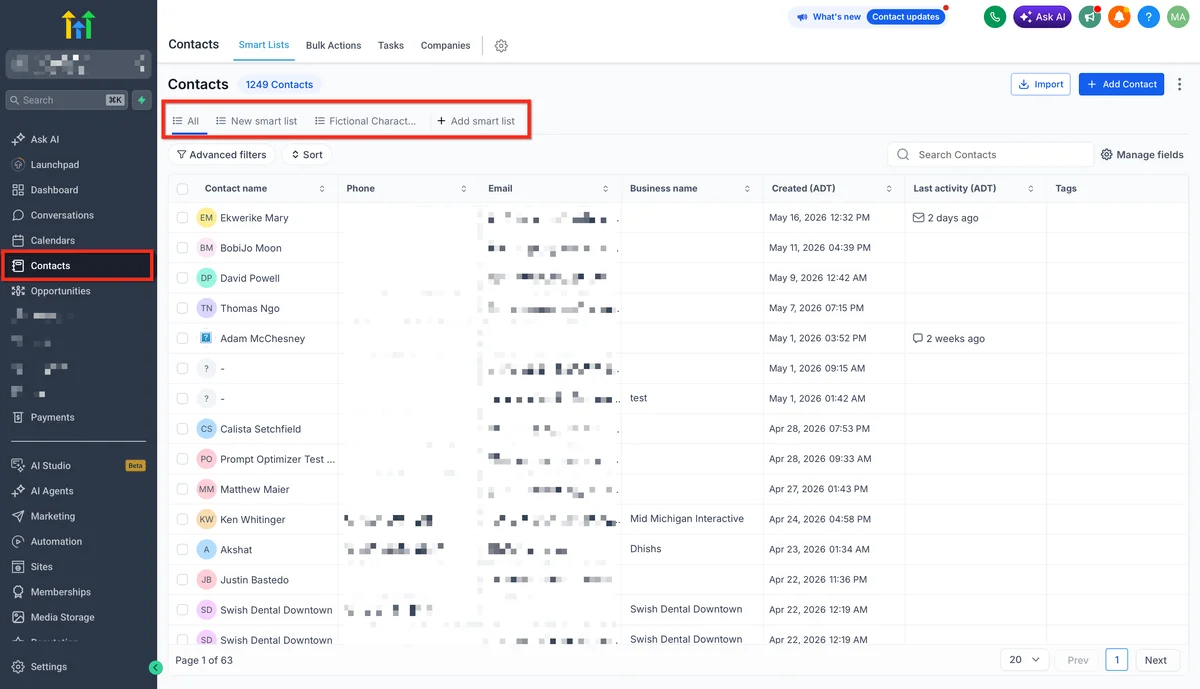
Custom Fields (Unlimited)
GoHighLevel supports unlimited custom fields on contact records. Beyond the standard fields (first name, last name, email, phone, address, company, website), you can create fields for any data point your business tracks.
Custom field types include:
- Text - free-form input
- Number - for numeric values (deal size, employee count, etc.)
- Date - for key dates (contract renewal, birthday, etc.)
- Dropdown - single-select lists
- Checkbox - multi-select options
- Radio - single-select with visible options
- File Upload - attach documents to the contact record
- Monetary - currency-formatted values
These fields appear on forms, in automations, in smart lists, and in reporting. A law firm might create fields for "Case Type," "Statute of Limitations Date," and "Referral Source." A real estate team might add "Home Search Radius," "Budget Range," and "Pre-Approved Amount." Whatever data matters to your business, you can capture and use it.
Custom fields can also be mapped from form submissions, automatically populating the contact record when a lead comes in.
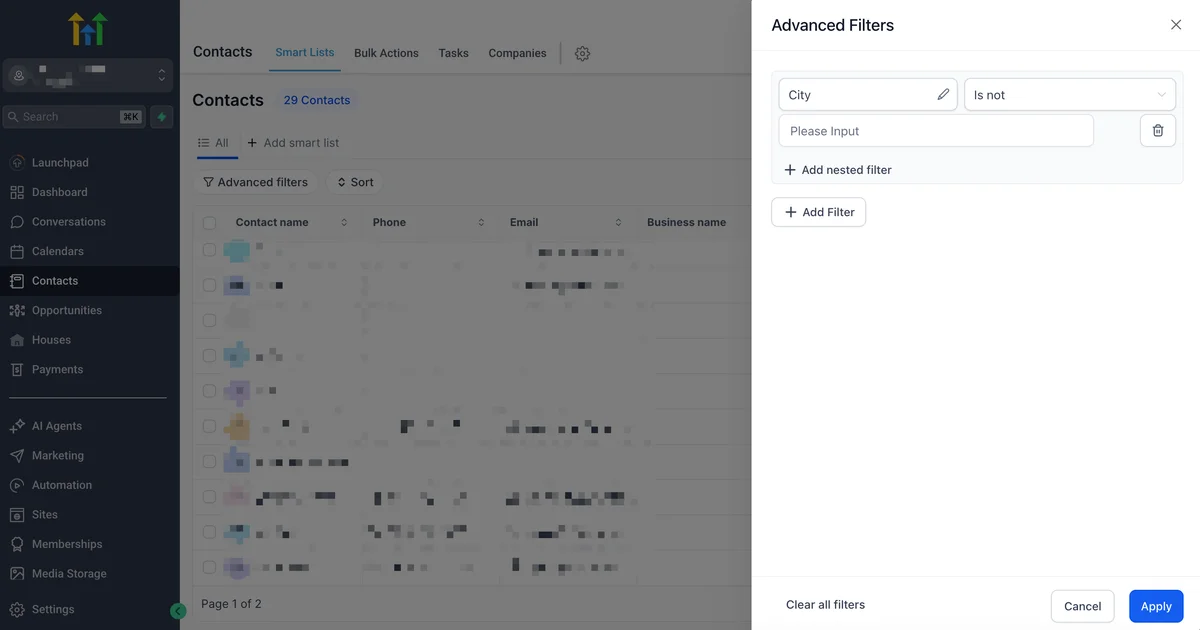
Smart Lists (Dynamic Segmentation)
Smart Lists are saved contact filters that update in real time as contacts enter or exit the criteria. This is one of the most powerful features in GHL's contact management system.
You can filter by any combination of:
- Custom field values
- Tags applied or absent
- Contact creation date
- Last activity date
- Pipeline stage
- Appointment history
- Message history
- Source/attribution
Example: "All contacts tagged 'Webinar Attended' who have not been tagged 'Proposal Sent' and were created within the last 60 days." This list updates automatically - as soon as a contact receives the "Proposal Sent" tag, they drop off the list without any manual intervention.
Smart Lists feed directly into bulk actions: send a broadcast SMS, launch a workflow, add a tag, or export to CSV.
Tags and Bulk Actions
Tags are the primary segmentation and automation trigger mechanism in GoHighLevel. A contact can have unlimited tags, and tags can be applied or removed manually, via form submissions, or through automation workflows.
Tags power:
- Smart Lists - build dynamic segments around tag combinations
- Workflow triggers - "When tag X is added, do Y"
- Workflow conditions - "If contact has tag X, send this path; if not, send that path"
- Bulk actions - select all contacts matching a filter and apply/remove tags in bulk
Bulk actions on contacts include: add tag, remove tag, add to pipeline, send email, send SMS, add to workflow, export, and delete.
Contact History, Notes, and Tasks
Every contact record shows a chronological activity timeline that logs:
- Emails sent and received (with full content)
- SMS conversations
- Phone calls (with call duration and recordings if enabled)
- Form submissions (including the form data submitted)
- Page visits (when tracking code is installed)
- Appointment bookings and cancellations
- Pipeline stage changes
- Workflow enrollment and exits
- Manual notes added by team members
Notes support rich text formatting and can be pinned for visibility. They are visible to anyone on the team with access to the contact.
Tasks can be created on any contact with a due date, assigned user, and description. The task appears in the assigned user's task list and generates reminders. Tasks are basic compared to dedicated project management tools, but they cover the core follow-up use case effectively.
DND (Do Not Disturb) Management
GoHighLevel's DND system lets you set communication restrictions per channel on each contact. DND settings are available for:
- SMS
- Calls
- Facebook Messenger
- GMB Messages
DND can be set manually or triggered automatically - for example, if a contact replies with "STOP" to an SMS, GHL automatically enables SMS DND for that contact to maintain compliance. This is a critical compliance feature for businesses using outbound communication at scale.
GoHighLevel Pipeline Management
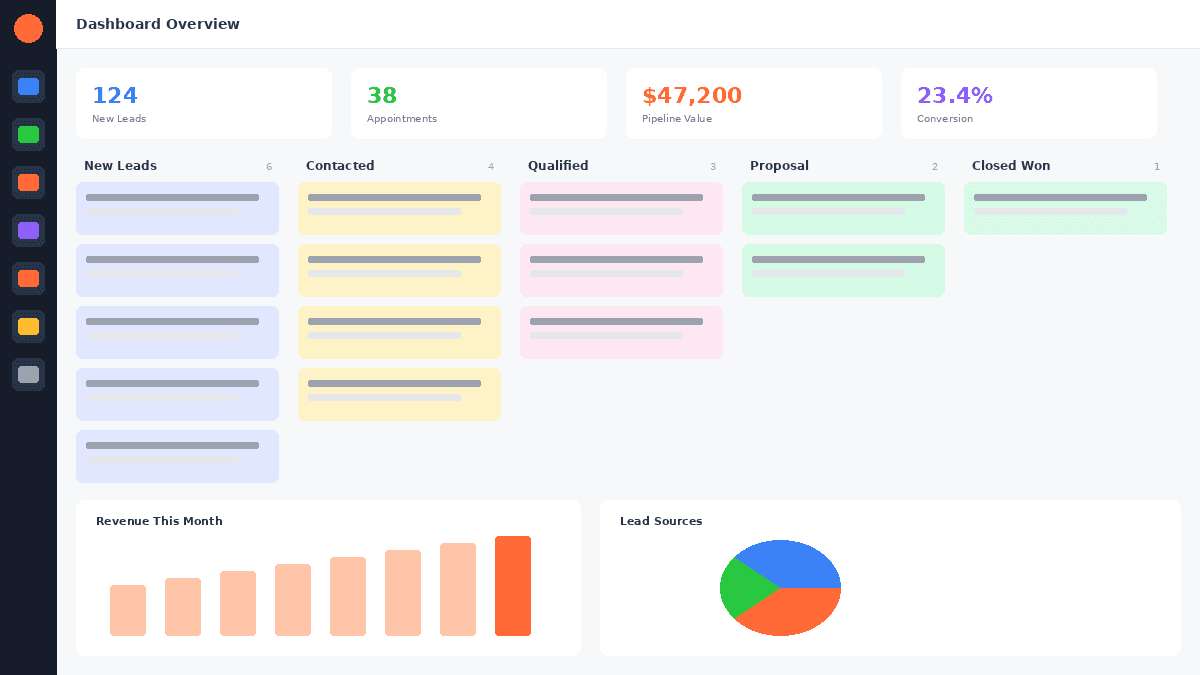
GoHighLevel's pipeline system is built around visual Kanban boards where deal cards move through customizable stages. It handles everything from simple single-step sales processes to complex multi-pipeline environments.
Creating and Customizing Pipelines
Creating a pipeline in GHL takes under two minutes. Navigate to Opportunities → Pipelines → Add Pipeline. Name it, then add as many stages as your process requires. Each stage has a customizable name and color.
There is no limit on the number of pipelines or stages. A marketing agency running multiple service lines might maintain separate pipelines for:
- New Business (Lead → Discovery Call → Proposal → Closed Won)
- Website Projects (Kickoff → Design → Development → Review → Launch)
- Monthly Retainers (Active → At Risk → Churned)
- Support Escalations (Open → In Progress → Pending Client → Resolved)
Each pipeline is entirely independent with its own stages, deals, and reporting. Contacts can exist across multiple pipelines simultaneously without any data conflicts.
Drag-and-Drop Deal Cards
Each opportunity (deal) in a pipeline appears as a card on the Kanban board. The card displays:
- Contact name
- Pipeline stage
- Deal value
- Last activity date
- Assigned user
- Tags
Dragging a card from one stage to another updates the deal record, logs the stage change on the contact timeline, and can trigger automations - automatically sending an email, creating a task, or launching a follow-up sequence based on the stage the card lands in.
Clicking a deal card opens the full opportunity detail: contact information, deal value, pipeline history, notes, and associated tasks. You can also manage the contact's communications directly from this view.
Revenue Tracking and Pipeline Value
Every opportunity has a monetary value field. GHL aggregates these values across the pipeline and displays:
- Total pipeline value - sum of all open opportunities
- Value by stage - how much revenue sits at each step
- Weighted pipeline - value multiplied by the conversion probability you assign to each stage
This gives a real-time revenue forecast without any manual calculation. A pipeline with ten deals at the Proposal Sent stage, each valued at $3,000, shows $30,000 at that stage - and if Proposal Sent has a 40% close rate, the weighted view shows $12,000 in expected revenue.
Pipeline Automation (Auto-Move Deals Based on Triggers)
This is where GHL's pipeline management separates itself from simpler tools. Deals can move automatically based on contact behavior:
- A contact books an appointment → deal moves to "Discovery Call Booked"
- A contact opens and clicks the proposal email → deal moves to "Proposal Reviewed"
- A contact fills out a contract form → deal moves to "Closed Won"
- 7 days pass with no activity → deal moves to "Stalled" and creates a follow-up task
These automations are built inside the Workflow editor (GHL's visual automation builder) and trigger on the same events as all other automations. Pipeline stage changes are both triggers and actions in the workflow system - you can trigger an automation when a deal enters a stage, or move a deal to a stage as the result of an automation.
GoHighLevel Unified Inbox (All-in-One Conversations)
The Unified Inbox - called Conversations in GHL - is the feature most users point to when explaining why they switched from a traditional CRM. It consolidates every communication channel into a single interface.
Channels Supported
GoHighLevel's Conversations inbox aggregates messages from:
- SMS - two-way text messaging via GHL's built-in phone numbers
- Email - inbound and outbound, with full thread view
- Phone Calls - call logs, recordings, and voicemail
- Facebook Messenger - direct messages from your connected Facebook page
- Instagram DMs - direct messages from your connected Instagram business account
- Google Business Messages - messages sent through your Google Business Profile listing
- WhatsApp - business messaging via WhatsApp Business API
- Live Chat - messages from GHL's website chat widget
Every message from every channel appears in the same Conversations interface, sorted by contact. When you open a conversation, you see the complete message history across all channels - a text from Tuesday, an email from Thursday, and a Facebook message from Friday are all visible in one thread.
Assign Conversations to Team Members
Conversations can be assigned to specific team members for ownership and accountability. Each team member sees their assigned conversations and can filter the inbox to show only their threads. Managers can see all conversations across the team.
Conversation assignment can be manual or automatic - workflows can auto-assign new leads to specific reps based on source, service type, territory, or round-robin rotation.
Response Templates
GHL supports saved response templates (called Snippets) for frequently sent messages. Instead of retyping a standard reply, team members insert a snippet with a few keystrokes. Snippets support merge fields, so "Hi {contact.firstName}, thanks for your message…" personalizes automatically per contact.
Snippets reduce response time and ensure consistent messaging across the team without requiring copy-paste from a separate document.
GoHighLevel CRM Automation
Automation is where GHL delivers the most operational leverage. The visual Workflow Builder connects CRM events - contact creation, pipeline stage changes, tag additions, form submissions, appointment bookings - to automated actions across every communication channel.
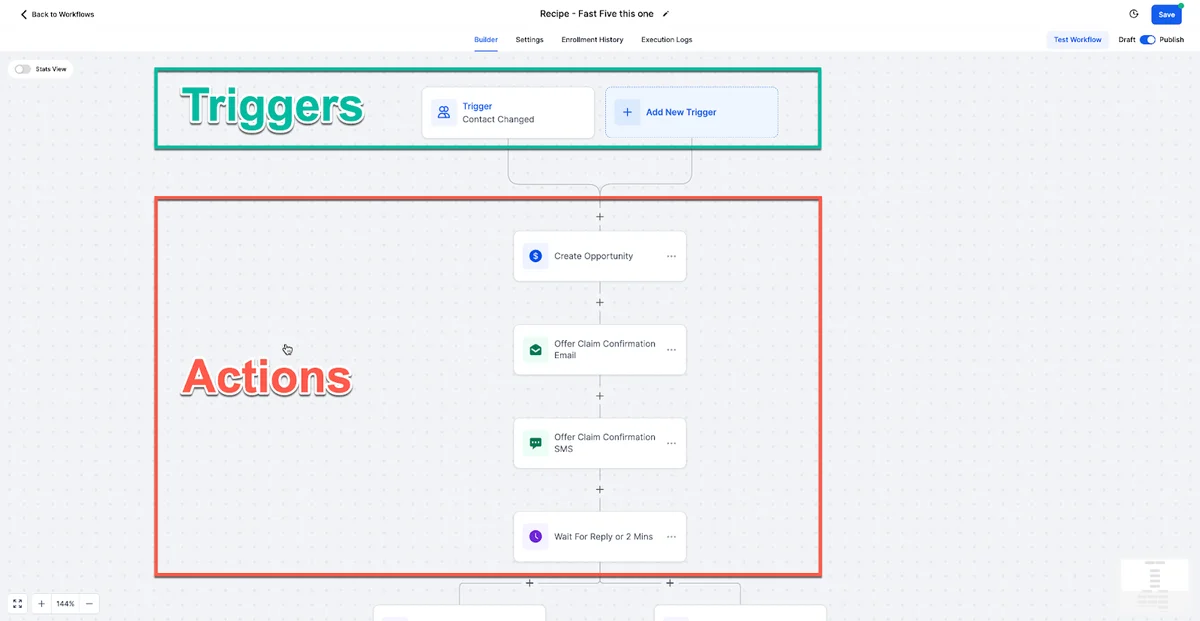
Trigger-Based Workflows
Every automation in GHL starts with a trigger. CRM-specific triggers include:
- Contact Created
- Tag Added / Removed
- Pipeline Stage Changed
- Opportunity Value Changed
- Appointment Booked / Cancelled / No-Showed
- Form Submitted
- Survey Submitted
- Invoice Paid / Overdue
- Task Created / Completed
- Contact DND Status Changed
These triggers fire the moment the event occurs, enabling real-time response. A new form submission at 11pm triggers an instant SMS without anyone on the team being awake.
Lead Scoring Rules
GoHighLevel supports contact-level lead scoring based on activity and attributes. You can assign point values to actions:
- Opened email: +5 points
- Clicked email link: +10 points
- Visited pricing page: +20 points
- Booked a call: +50 points
- Has company field filled: +15 points
When a contact crosses a score threshold, a workflow triggers automatically - routing the contact to a sales rep, moving them to a high-priority pipeline stage, or sending an alert to the assigned user.
Lead scoring in GHL is functional but not as sophisticated as HubSpot's predictive scoring models. It is rule-based rather than AI-driven, which is sufficient for most service businesses.
Auto-Assign to Sales Reps
New leads can be automatically assigned to team members using:
- Fixed assignment - all leads from a specific source go to one rep
- Round-robin - leads rotate evenly across a rep pool
- Custom logic - assign based on territory, service type, or contact field values using If/Else conditions in the workflow
Assignment creates a task, sends an internal notification to the rep (email or SMS), and updates the contact record with the assigned user. The rep receives full contact context immediately.
Automatic Follow-Up Sequences
GHL's multi-step sequences handle follow-up across multiple channels with conditional branching. A standard lead nurture sequence might look like:
- Immediately - Send SMS introduction
- +1 hour - Send email with case study or service overview
- +24 hours - Check if contact replied (If/Else). If yes → notify rep. If no → continue.
- +24 hours (no reply) - Send second SMS with a softer follow-up
- +72 hours (no reply) - Send voicemail drop
- +7 days (no reply) - Move deal to "Long-Term Nurture" pipeline stage and reduce message frequency
This kind of sequence would require separate tools for SMS (Twilio/SimpleTexting), email (Mailchimp/ActiveCampaign), voicemail drops (Slybroadcast), and a workflow connector (Zapier) at most CRMs. In GHL, it is one workflow in one interface.
GoHighLevel CRM vs Salesforce vs HubSpot vs Pipedrive
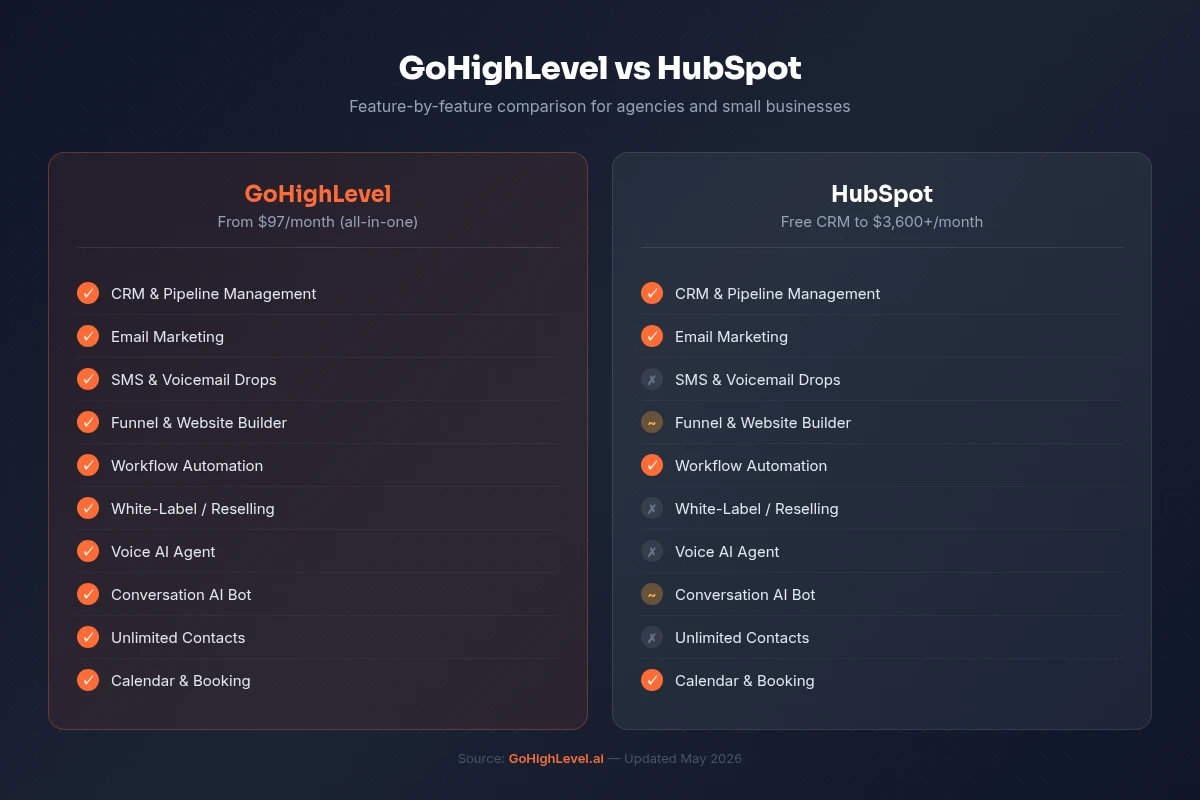
| Feature | GoHighLevel | HubSpot (Pro) | ||
|---|---|---|---|---|
| Starting Price | $97/month | $800/month | $25/user/month | $14.90/user/month |
| Contact Limit | Unlimited | Up to plan | Unlimited | Unlimited |
| Pipelines | Unlimited | Unlimited (paid) | Unlimited | Unlimited |
| Built-in SMS | ✅ Native | ❌ Integration only | ❌ Integration only | ❌ Integration only |
| Built-in Email | ✅ Native | ✅ Native | ✅ Native | ✅ Native |
| Unified Inbox | ✅ 8 channels | ⚠️ Limited | ⚠️ With add-ons | ❌ No |
| ✅ Native | ✅ (paid add-on) | ❌ Integration only | ❌ Integration only | |
| Workflow Automation | ✅ Visual builder | ✅ Visual builder | ✅ Flow Builder | ⚠️ Basic |
| Lead Scoring | ✅ Rule-based | ✅ Predictive AI | ✅ Einstein AI | ⚠️ Basic |
| Built-in Funnels/Pages | ✅ Native | ✅ Native | ❌ No | ❌ No |
| White-Label Available | ✅ Yes ($497/mo) | ❌ No | ❌ No | ❌ No |
| Reporting | ✅ Standard | ✅ Advanced | ✅ Enterprise-grade | ✅ Standard |
| Custom Objects | ❌ Limited | ✅ (Enterprise) | ✅ Native | ❌ No |
| API Access | ✅ REST API | ✅ Full API | ✅ Full API | ✅ Full API |
| Free Trial | 30 days (extended) | 14 days | 30 days | 14 days |
The takeaway from this comparison is clear: GoHighLevel is the most complete platform per dollar for agencies and service businesses. Salesforce wins on enterprise-grade customization and scalability. HubSpot wins on marketing analytics and predictive intelligence. Pipedrive wins on pure sales pipeline simplicity at a lower entry cost.
For a business that needs CRM + SMS + email + pipeline + automation in one tool, GHL is almost certainly the most cost-effective choice.
FREE TRIAL
Get 30 Days Free With Our Partner Link
- ✓Full access for 30 days
- ✓No charge during the trial
- ✓Cancel any time
Join 2.2 million businesses already running on GoHighLevel
Reporting and Analytics in GHL CRM
GoHighLevel provides reporting across four core areas relevant to CRM users.
Dashboard Metrics
The GHL dashboard is configurable and shows real-time metrics at a glance:
- New contacts today / this week / this month
- Open conversations by channel
- Appointments booked vs. completed
- Pipeline value and deal count
- Task completion rate
The dashboard is the first thing your team sees on login - keeping key metrics visible without navigating to reports.
Pipeline Value Reports
The Opportunities report (under Reporting → Opportunities) breaks down pipeline performance:
- Total opportunities created in a date range
- Opportunities by stage - how many deals are at each step
- Pipeline value by stage - total revenue potential at each step
- Won vs. lost rate - your close rate over time
- Average deal value - mean revenue per closed opportunity
- Time in stage - how long deals sit at each step before moving
Time-in-stage data is particularly valuable. If deals at "Proposal Sent" average 18 days before closing (or dying), that tells you something about your sales process that no dashboard summary reveals.
Source Attribution
GHL tracks where contacts come from - which ad, form, landing page, or traffic source generated each lead. Attribution data appears:
- On the individual contact record (Source field)
- In the Contact Source report (aggregate by source)
- In pipeline reports (filter pipeline value by source)
For agencies running paid ads, this closes the loop between ad spend and pipeline revenue without requiring a separate attribution tool.
Conversation Reports
The Conversations report tracks communication activity:
- Total conversations opened / closed in a date range
- Conversations by channel (SMS, email, call, etc.)
- Average response time by team member
- Message volume over time
- Missed calls and voicemails
Response time data is critical for sales teams - the faster a lead is contacted, the higher the conversion rate. GHL's response time report makes accountability measurable.
Who Is GoHighLevel CRM Best For?
GoHighLevel's CRM is an ideal fit for:
Marketing and digital agencies - The multi-location, sub-account structure lets agencies manage dozens of client CRMs from a single login. Each client gets their own contacts, pipelines, automations, and inbox. White-label plans ($497/month) let agencies rebrand GHL as their own software product.
Service businesses with high lead volume - Plumbers, HVAC companies, law firms, insurance agents, mortgage brokers, and similar businesses handle high inbound inquiry volume across multiple channels. GHL's unified inbox and automated follow-up sequences handle this without hiring additional staff.
Sales teams running multi-channel outreach - Teams that rely on both email and SMS outreach benefit from GHL's native multi-channel capabilities. No Zapier connections, no API maintenance - it works out of the box.
Coaches, consultants, and course creators - GHL combines CRM with course delivery, membership sites, funnel builders, and appointment scheduling. Instead of paying separately for Kajabi, Calendly, ActiveCampaign, and a CRM, GHL handles all of it.
Small to mid-size businesses (1–200 employees) - GHL scales comfortably up to 200-person organizations. Beyond that, the lack of enterprise features (custom objects, advanced permissions, complex territory management) may become limiting.
Limitations of GoHighLevel as a CRM
An honest evaluation requires acknowledging where GHL falls short.
Not built for enterprise sales complexity. Salesforce's custom objects, multi-currency support, complex territory hierarchies, CPQ (Configure-Price-Quote), and Apex code customization are in a different league. If your sales process requires custom relational data structures or advanced forecasting models, GHL will feel limiting. Enterprise sales organizations (500+ seats, complex multi-division structures) should evaluate Salesforce or Microsoft Dynamics.
Reporting is functional, not advanced. GHL's reports cover the essentials but lack the depth of HubSpot's Marketing Hub or Salesforce's Einstein Analytics. Custom report builders, complex attribution models, and multi-touch revenue attribution are not native in GHL. For data-driven marketing teams that live in dashboards, this is a real gap.
Lead scoring is rule-based only. HubSpot and Salesforce offer AI-driven predictive lead scoring that learns from historical data. GHL's scoring is manual rule-based - you define the rules and point values, which requires ongoing maintenance and domain expertise to configure well.
No native CPQ or quote management. GHL can send invoices and process payments, but it does not have a formal proposal or quote builder tied to the CRM. Sales teams that rely on structured quoting workflows typically need a separate tool (PandaDoc, Proposify, or similar).
Call center features are limited. While GHL supports VoIP calling and call recording, it lacks advanced call center capabilities like intelligent call routing, whisper coaching, barge-in, and call queue management that dedicated CCaaS platforms provide.
The learning curve is real. GHL is powerful precisely because it covers so much ground. New users often feel overwhelmed by the breadth of features. The onboarding investment is higher than using a single-purpose tool. Plan for 2–4 weeks of structured setup and training before your team is operating at full efficiency.
Related Resources
- Read our guide on automation workflows
- Read our guide on GoHighLevel pricing plans
- Read our guide on features overview
- Visit the GoHighLevel official CRM page
- Visit the G2 GoHighLevel reviews
Frequently Asked Questions
Is GoHighLevel really a CRM or just a funnel builder?
How many pipelines can you have in GoHighLevel?
Can GoHighLevel replace HubSpot?
Does GoHighLevel have a mobile app?
What communication channels does GoHighLevel CRM support natively?
How does GoHighLevel handle GDPR and compliance?
How much does GoHighLevel cost for CRM features?
The Bottom Line on GoHighLevel as a CRM
GoHighLevel is a legitimate, fully-featured CRM - not a simplified contact list with a pipeline bolted on. Its contact management, pipeline flexibility, automation depth, and Unified Inbox capability match or exceed purpose-built CRM tools for the use cases it targets.
The businesses that get the most value from GHL as a CRM are those that also need multi-channel communication (SMS, email, calls), marketing automation, and the efficiency of managing everything in one system. For those businesses, the consolidation savings alone - eliminating separate SMS platforms, email tools, appointment schedulers, and pipeline managers - typically cover the GHL subscription many times over.
For enterprise organizations with complex custom data models, advanced forecasting requirements, or large dedicated CRM administration teams, Salesforce or Microsoft Dynamics remain better fits.
For everyone else - agencies, service businesses, SMBs, and sales teams - GoHighLevel's CRM is worth a serious evaluation. The 30-day trial makes that evaluation risk-free.
EXTENDED FREE TRIAL
Start with 30 days free, not 14.
Use our partner link to get double the standard 14-day trial.
Start Your Free 30-Day Trial →Ashley Kemp is a digital entrepreneur and perpetual traveller. Switched from ClickFunnels to GoHighLevel years ago and never looked back. Writing about what actually works.
Was this article helpful?