GoHighLevel Integrations 2026: Native + Zapier List
23 min read · Updated April 2026
How many integrations does GoHighLevel have?
GoHighLevel has 50+ native built-in integrations (Stripe, Google, Facebook, Zoom, Shopify, QuickBooks, and more) plus access to 2,000+ additional GoHighLevel Marketplace via Zapier and Make. It also offers a full REST API and webhook system for custom integrations. Nearly any tool in your marketing or sales stack can be connected.
TL;DR
- GoHighLevel connects natively with the tools that matter most - Stripe, Google Ads, Facebook Ads, Zoom, Shopify, QuickBooks, and 40+ more - with no middleware required.
- Via Zapier and Make, you gain access to 2,000+ additional apps, covering virtually every SaaS tool in existence.
- The REST API and webhooks let developers build fully custom integrations, making GHL the central hub for any business tech stack.
EXTENDED FREE TRIAL
Start with 30 days free, not 14.
Use our partner link to get double the standard 14-day trial.
Start Your Free 30-Day Trial →How GoHighLevel Integrations Work
Before diving into specific tools, it helps to understand the three-layer integration architecture that makes GoHighLevel so flexible. GHL is not a walled garden - it is built to connect with the rest of your stack at multiple levels of depth.
Layer 1: Native Built-In Integrations
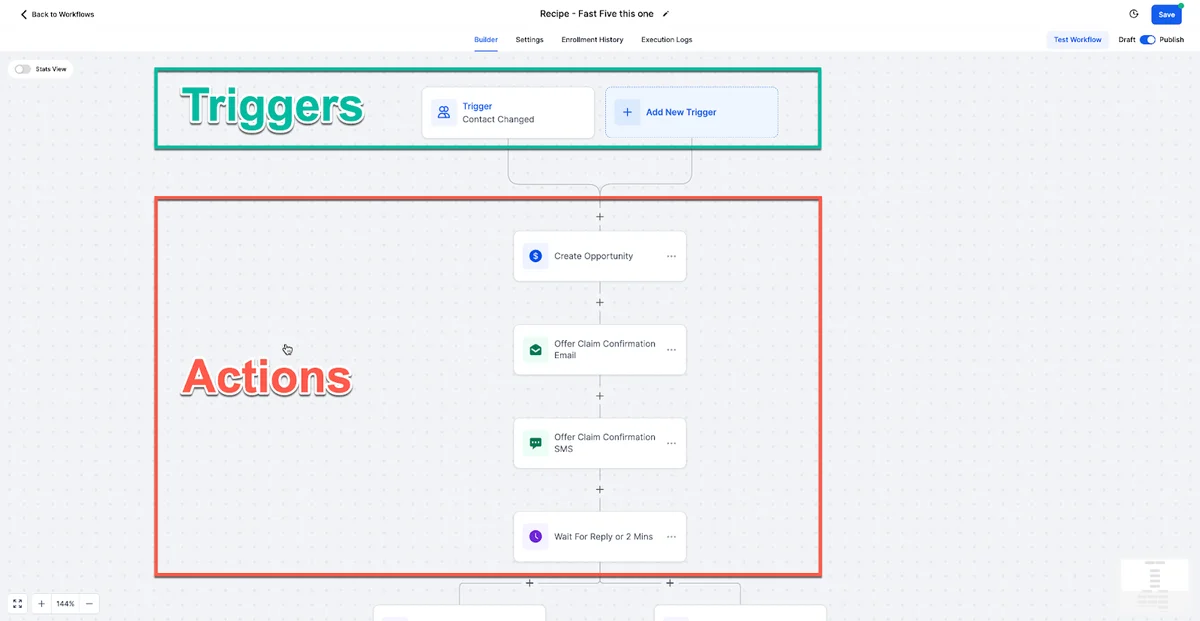
These are direct, first-party connections built and maintained by the GoHighLevel engineering team. You connect them from inside your GHL dashboard (Settings → Integrations) with a few clicks - usually just OAuth authorization or entering an API key. Once connected, data flows GoHighLevel automation workflows in both directions, and GHL's automation workflows can trigger actions inside those tools natively.
Native integrations are the deepest connections. They surface in your workflows as named trigger and action steps (e.g., "Stripe: Charge Customer," "Google Calendar: Create Event") with full two-way sync where applicable.
Layer 2: Zapier and Make (2,000+ Apps)
When GoHighLevel does not have a direct native integration with a tool, Zapier and Make fill the gap. Both platforms act as a bridge - they listen for events in one app and trigger actions in another. GoHighLevel has an official Zapier app and an official Make (Integromat) module, meaning both platforms can send data into GHL and receive data from GHL.
Through Zapier alone, you gain access to 2,000+ apps. Through Make, you can build complex multi-step workflows with conditional logic, data transformation, and error handling that goes beyond what Zapier handles easily.
Layer 3: Webhooks and REST API
For developers and technically capable teams, GoHighLevel provides a full REST API and a webhook system. Webhooks let GHL push real-time event data (new GoHighLevel CRM created, appointment booked, payment received, etc.) to any endpoint you control - whether that is a custom backend, a serverless function, or a tool like Pipedream. The REST API lets you programmatically read and write almost any GHL data: contacts, opportunities, calendars, campaigns, sub-accounts, and more.
This layer enables fully custom integrations that no middleware platform can replicate - ERP systems, custom CRMs, proprietary databases, or legacy tools.
Native GoHighLevel Integrations
The following integrations are built directly into GoHighLevel. No third-party automation tool is required - you connect them once from your settings, and they work automatically inside your workflows and sub-accounts.
Stripe
Stripe is GoHighLevel's primary payment integration and the most important one for most businesses. Once connected, GHL can:
- Create one-time payment links and checkout pages
- Sell products and services directly from GHL funnels
- Set up recurring subscriptions with flexible billing cycles
- Track payment status and attach transactions to contact records
- Trigger automations on payment success, failure, or refund
- Display revenue data inside GHL's reporting dashboard
The Stripe integration essentially turns GoHighLevel into a complete commerce platform. Agencies use it to bill clients; coaches use it to sell programs; service businesses use it to collect deposits. You do not need a separate cart platform for most use cases.
MCP Server (Model Context Protocol)
GoHighLevel's MCP Server lets external AI agents. Claude, GPT, or custom models. Read and write CRM data directly via a standardised protocol. Instead of building custom API integrations, connect once with a Private Integration Token and your AI agent gets access to contacts, calendars, conversations, opportunities, and payments. For the full setup guide, see our MCP Server guide.
HubSpot
As of May 2026, GoHighLevel has a native HubSpot integration built into the Workflow Builder. It includes an instant trigger when new contacts are created in HubSpot, plus actions to create and find contacts from GHL workflows. OAuth authentication. No Zapier needed for contact sync. The integration currently covers contacts; deal and pipeline sync is on the roadmap. For a full walkthrough, see our HubSpot integration setup guide.
PayPal
PayPal connects to GHL funnels and order forms as an alternative payment method alongside Stripe. Many buyers - especially in certain geographies or demographics - prefer PayPal over entering card details. Adding PayPal as a payment option in your GHL funnels can meaningfully increase checkout conversion. The integration supports one-time payments; subscription billing through PayPal requires more setup than with Stripe.
Google (Calendar, Meet, Ads, Analytics, My Business)
Google has several distinct integration points with GoHighLevel:
Google Calendar: Two-way sync between GHL's calendar and Google Calendar. Appointments booked in GHL appear in Google Calendar automatically, and existing Google Calendar events block your GHL availability to prevent double-booking.
Google Meet: When a contact books an appointment via a GHL calendar that uses Google Meet, a unique Google Meet link is generated automatically and included in the confirmation email and SMS. No manual link creation required.
Google Ads: Connect your Google Ads account to track which GHL forms and landing pages are converting, pass conversion events back to Google for smart bidding optimization, and run call tracking through GHL's LC Phone while attributing calls to specific ad campaigns.
Google Analytics: Add your GA4 measurement ID to GHL funnels and websites to track traffic, pageviews, and conversions alongside your other web properties in one analytics dashboard.
Google My Business: Sync your Google Business Profile reviews into GHL's reputation management dashboard. Respond to reviews from inside GHL without switching tabs, and automate review request campaigns that funnel satisfied customers to your GMB listing.
Facebook (Ads, Messenger, Lead Ads)
Facebook integrations are critical for agencies running paid social campaigns:
Facebook Lead Ads: When a prospect completes a Facebook Lead Ad form (the native mobile form that does not require leaving Facebook), their information flows directly into GHL as a new contact. An automation workflow fires immediately - typically an SMS or email follow-up - while the lead is still warm. This eliminates the manual lead import step that costs agencies hours every week.
Facebook Messenger: Connect your Facebook Page to GHL's Conversations inbox. Incoming Messenger messages appear alongside SMS, email, and web chat messages in a single unified inbox. You can respond from GHL, and responses appear in Messenger for the contact.
Facebook Ads: Link your Facebook Ads Manager account to track ad attribution, pass conversion events from GHL back to Facebook for pixel optimization, and create retargeting audiences based on CRM segments.
Twilio (SMS and Voice)
GoHighLevel has its own built-in phone system called LC Phone (powered by Twilio under the hood), which most users should use by default. However, if you already have existing Twilio numbers, high volumes, or specialized use cases, you can connect your own Twilio account directly and bring your existing numbers into GHL. This gives you full control over your messaging costs and number management while still using GHL's workflow and CRM layer on top.
Mailgun / SMTP
For email sending, GHL offers LC Email (its built-in sending infrastructure) but also supports connecting external SMTP providers. Mailgun is the most common choice for agencies that need higher deliverability control, dedicated IPs, or custom domain sending. You can also connect SendGrid, Postmark, or any SMTP-compliant service. This is particularly valuable for high-volume email senders who need detailed deliverability metrics outside of GHL.
QuickBooks
The QuickBooks integration syncs financial data between GHL and your accounting software. When a payment is recorded in GHL (via Stripe), it can automatically create a corresponding invoice or transaction record in QuickBooks, keeping your books accurate without manual entry. This is a significant time saver for agencies billing multiple clients monthly and for any business that needs clean financial records for tax purposes.
WordPress
GHL's WordPress integration works in two directions. First, you can embed GHL forms, surveys, and chat widgets on any WordPress site by pasting a simple embed code - no plugin required. Second, you can install the GHL WordPress plugin to add tracking scripts, manage pop-ups, and trigger GHL automations based on WordPress page visits. This means your existing WordPress site can feed leads directly into GHL without migrating away from WordPress.
Shopify
The Shopify integration connects your e-commerce store to GHL's CRM and automation engine. As of May 2026, Shopify now uses a 1-click OAuth connection with no API tokens or custom app creation needed. When a customer places an order in Shopify, a contact is created or updated in GHL, and you can trigger post-purchase automations - thank-you sequences, upsell campaigns, review requests, or abandoned cart follow-ups via SMS. For e-commerce brands that want CRM-level relationship marketing on top of Shopify's store functionality, this integration is a significant unlock.
Zoom
GHL's Zoom integration works similarly to Google Meet. When a contact books a meeting on a Zoom-enabled GHL calendar, a unique Zoom meeting link is created automatically and delivered in the confirmation and reminder messages. No manual scheduling from inside Zoom. Combined with GHL's appointment reminder workflow, you can eliminate no-shows without any manual coordination.
GoHighLevel + Zapier Integration
Zapier is the most widely used integration middleware in the world, and GoHighLevel has an official, well-maintained Zapier app. This gives GHL users access to 2,000+ additional applications - any tool that lives on Zapier can be connected to GoHighLevel.
How to Set Up the GoHighLevel Zapier Integration
- Log in to your Zapier account (or create one at zapier.com)
- Click "Create Zap" and search for "GoHighLevel" as either the trigger or action app
- Authenticate with your GHL API key (found in GHL → Settings → API)
- Choose your trigger event (e.g., "Contact Created," "Opportunity Stage Changed," "Form Submitted")
- Choose your action app and the action to perform
- Test the Zap and turn it on
GHL's Zapier triggers include: Contact Created, Contact Updated, Opportunity Created, Opportunity Stage Changed, Form Submitted, Appointment Booked, Invoice Paid, and more. GHL's Zapier actions include: Create Contact, Update Contact, Create Opportunity, Add Tag, Remove Tag, Add to Campaign, and others.
Best Zaps to Build for GoHighLevel
Typeform → GHL: When a Typeform response is submitted, create or update a contact in GHL and fire an automation workflow. Great for quiz funnels and multi-step intake forms.
GHL → Google Sheets: When a new contact is created in GHL, add a row to a Google Sheet. Useful for reporting dashboards, client-facing lead trackers, or data exports.
GHL → Slack: When an opportunity reaches a specific pipeline stage (e.g., "Proposal Sent"), send a Slack message to your sales team channel. Keeps the team informed without manual updates.
Calendly → GHL: If you are using Calendly for legacy bookings, automatically create contacts in GHL when a Calendly appointment is booked - then migrate to GHL's native calendar to eliminate this Zap entirely.
GHL → ActiveCampaign: During a migration period, mirror new GHL contacts to an existing ActiveCampaign account to maintain continuity across both systems.
WooCommerce → GHL: Sync WooCommerce orders into GHL contacts for post-purchase follow-up campaigns (for WordPress store owners who are not on Shopify).
GoHighLevel + Make (Integromat) Integration
Make (formerly Integromat) is the power user's alternative to Zapier. While Zapier excels at simple two-step automations, Make shines for complex, multi-branch workflows that require data transformation, conditional routing, iteration over arrays, and advanced error handling.
GoHighLevel has an official Make module with a comparable set of triggers and actions to its Zapier app. The key advantages of using Make with GHL:
Visual workflow canvas: Make's drag-and-drop interface makes complex multi-step scenarios easy to understand and debug. You can see the entire data flow at a glance.
Data transformation: Make has built-in data manipulation functions - parsing JSON, reformatting dates, splitting arrays, aggregating data - that typically require additional Zapier steps or premium tools.
Cost efficiency: Make is generally cheaper than Zapier for high-volume automation, charging by operations rather than tasks. For agencies running many integrations across many sub-accounts, the cost difference is significant.
Error handling: Make lets you define what happens when a step fails - retry, skip, alert, branch to an alternate path - with more granularity than Zapier's basic error handling.
When to use Zapier vs Make: Start with Zapier if you want something set up in 10 minutes for simple triggers and actions. Use Make when your workflow has conditional logic, processes data in bulk, needs to interact with multiple apps in sequence, or when cost is a concern at scale.
The 20 Most Useful GoHighLevel Integrations
Here is the ranked list of the 20 most valuable GHL integrations for agencies, coaches, and service businesses - with a brief explanation of why each one matters.
1. Stripe - The single most important integration. Connects payments directly to your CRM, automates billing, and enables GHL to function as a complete commerce platform without a separate cart tool.
2. Google Ads - Closes the loop between ad spend and CRM outcomes. Pass conversions back to Google for smart bidding, track which campaigns produce contacts that close, and improve ROAS with accurate attribution.
3. Facebook Ads + Lead Ads - Instantly routes Facebook Lead Ad submissions into GHL with zero lag, enabling immediate follow-up while leads are maximally warm. Every agency running Facebook campaigns needs this.
4. Zapier - Unlocks 2,000+ additional app connections. If a native integration does not exist, Zapier almost certainly fills the gap. Essential for any business with a diverse tech stack.
5. Google Calendar - Two-way sync ensures your GHL calendar and personal Google Calendar always match. Prevents double-booking and keeps your schedule consolidated in one place.
6. WordPress - Lets you keep your existing WordPress site while feeding all lead capture forms into GHL. No site migration required to start using GHL as your CRM and automation hub.
7. Zoom - Eliminates manual meeting link creation. Every GHL-booked appointment automatically gets a unique Zoom link, delivered across all confirmation and reminder messages.
8. Shopify - Turns Shopify customers into GHL contacts, enabling post-purchase SMS campaigns, review requests, and loyalty sequences that the Shopify ecosystem alone cannot deliver.
9. QuickBooks - Automates the payment-to-invoice pipeline. GHL-collected Stripe payments flow into QuickBooks without manual bookkeeping. Critical for agencies billing clients monthly.
10. Twilio - For businesses with existing Twilio numbers or high SMS/voice volume needs. Bring your own Twilio account for maximum deliverability control while using GHL's automation layer.
11. Make (Integromat) - The power-user alternative to Zapier. Better for complex, multi-step workflows with data transformation, conditional logic, and high-volume operations at lower cost.
12. PayPal - Adds a second payment option to GHL funnels and order forms, increasing checkout conversion for audiences that prefer PayPal over card entry.
13. Google My Business - Centralizes review management. Pull all GMB reviews into GHL, respond without leaving the platform, and automate review request campaigns to build your local search presence.
14. Mailgun - Provides dedicated email sending infrastructure for agencies that need maximum deliverability, custom domains, and detailed send analytics beyond LC Email's built-in capabilities.
15. Slack - Via Zapier or Make, route GHL events (new high-value lead, deal closed, payment failed) to specific Slack channels. Keeps your team informed without building manual notification habits.
16. Calendly (replace it) - GHL's built-in calendar system replicates everything Calendly does - round-robin booking, team calendars, custom availability, embedded booking pages - at no additional cost. Connecting Calendly via Zapier is a transitional step; the goal is to migrate fully to GHL calendars.
17. ActiveCampaign (migrate from it) - During migration from ActiveCampaign to GHL, Zapier can mirror data between both systems. Once your GHL automations are built and tested, you can sunset ActiveCampaign and eliminate that subscription entirely.
18. HubSpot (migrate from it) - Similarly, a Zapier bridge allows a controlled migration from HubSpot's CRM and email marketing features into GHL. The native GHL CRM handles everything HubSpot's starter and professional tiers offer, at a fraction of the cost.
19. Typeform - Connect Typeform's multi-step, conditional logic surveys to GHL via Zapier. When a Typeform is completed, create a tagged GHL contact and fire a segmented automation based on the answers.
20. Google Sheets - Via Zapier or Make, pipe GHL contact and opportunity data into Google Sheets for client-facing reporting, lightweight data analysis, or backup exports. A foundational data integration for any agency.
GoHighLevel API and Webhooks
For developers and technically advanced teams, GoHighLevel provides a comprehensive REST API and webhook infrastructure that enables fully custom integrations beyond what any middleware platform offers.
The GoHighLevel REST API
The GHL REST API follows standard RESTful conventions with JSON request and response bodies. It supports authentication via API keys (location-level) and OAuth 2.0 (for marketplace apps or multi-account tools). The API exposes endpoints for virtually every GHL data object:
- Contacts: Create, read, update, delete contacts; manage tags, notes, and tasks
- Opportunities (Deals): Create and update pipeline opportunities; move stages programmatically
- Calendars and Appointments: Read availability, book appointments, update or cancel bookings
- Campaigns and Workflows: Enroll contacts in workflows, trigger campaign actions
- Forms and Surveys: Retrieve submissions, manage form configurations
- Sub-accounts (Locations): For agencies, manage client sub-accounts programmatically
- Invoices and Payments: Create invoices, retrieve payment records
- Reporting: Pull snapshot data for dashboard-level reporting in external BI tools
API documentation is available at developers.gohighlevel.com. The GHL developer community is active, and the API has matured significantly since GHL's early days - it is now reliable enough to build production integrations on top of.
GoHighLevel Webhooks
Webhooks let GHL push real-time event data to any HTTPS endpoint you configure. Rather than polling the API to detect changes, your system receives an instant POST request the moment an event occurs in GHL. Supported webhook events include:
- Contact Created / Updated / Deleted
- Opportunity Created / Stage Changed
- Appointment Booked / Cancelled
- Form / Survey Submitted
- Conversation Message Received
- Invoice Paid / Payment Failed
- Campaign Step Executed
Webhooks are configured at the sub-account level (Settings → Integrations → Webhooks). You provide the endpoint URL, select which events to subscribe to, and GHL begins delivering event payloads immediately. This is the foundation for integrating GHL with custom backends, internal tools, ERP systems, or any proprietary application your business runs.
Practical Developer Use Cases
Custom reporting dashboards: Pull contact and opportunity data via API into a business intelligence tool (Looker Studio, Metabase, Tableau) for advanced reporting beyond GHL's native analytics.
ERP sync: Use webhooks to detect new GHL invoices paid, then write records to your ERP's API - creating a fully automated billing-to-accounting pipeline for enterprise clients.
Custom mobile apps: Build client-facing apps that display appointment status, payment history, or job progress by reading GHL data via the REST API.
White-label automation tools: Agencies building their own branded automation tools on top of GHL's infrastructure use the OAuth API to manage sub-accounts at scale without manual dashboard access.
FREE TRIAL
Get 30 Days Free With Our Partner Link
- ✓Full access for 30 days
- ✓No charge during the trial
- ✓Cancel any time
Join 2.2 million businesses already running on GoHighLevel
Which GoHighLevel Plan Do You Need for Integrations?
Not all integrations are available on every GoHighLevel plan. Here is what you need to know before committing:
Starter Plan ($97/month): Includes most native integrations - Stripe, PayPal, Google Calendar, Facebook Lead Ads, Zoom, Mailgun, and WordPress. You get the core connection layer. However, the Starter plan limits you to a single location (one business), which matters for agencies managing multiple clients. API access on Starter is restricted.
Unlimited Plan ($297/month): Unlocks full API access, unlimited sub-accounts (locations), and all native integrations without restriction. This is the plan most agencies and serious businesses should run. Zapier and Make integrations work fully at this tier. The Unlimited plan also includes SaaS Mode, which lets you white-label GHL and resell it as your own platform.
SaaS Pro Plan ($497/month): Adds white-label capabilities, a branded mobile app, and priority support. Integrations are the same as Unlimited - the upgrade is about the SaaS reselling and branding, not integration depth.
Key takeaway: If you need API access for custom integrations or developer work, you need the Unlimited plan or higher. If you are a single business owner using native integrations and Zapier, the Starter plan covers your needs.
| Feature | Starter ($97/mo) | Unlimited ($297/mo) | |
|---|---|---|---|
| Native Integrations (Stripe, Google, Facebook) | Yes | Yes | Yes |
| Zapier / Make Integration | Yes | Yes | Yes |
| REST API Access | Limited | Full | Full |
| Webhooks | Yes | Yes | Yes |
| Number of Sub-Accounts | 1 | Unlimited | Unlimited |
| White-Label SaaS Mode | No | Yes | Yes |
| Branded Mobile App | No | No | Yes |
How Integrations Affect Your Workflow: A Real-World Example
Abstract integration lists are useful, but the real value becomes clear when you see how multiple integrations chain together to create a fully automated revenue pipeline. Here is a practical example that any service business or agency can replicate:
Step 1 - Lead captured via Facebook Ad A prospect sees your Facebook Ad and clicks the native Lead Ad form. They enter their name, email, and phone number without leaving Facebook. The GoHighLevel Facebook Lead Ads integration detects the form submission in real time.
Step 2 - Contact created in GHL CRM Within seconds, a new contact record is created in your GoHighLevel CRM, tagged with the Facebook campaign and ad set that drove the lead. The contact's details - name, email, phone - are automatically populated.
Step 3 - Instant SMS follow-up fires A GHL workflow triggers immediately. An SMS is sent to the lead within 90 seconds: "Hi [Name], thanks for your interest in [Service]. I'm reaching out personally - are you available for a quick 15-minute call today?" This speed-to-lead response happens automatically, 24 hours a day.
Step 4 - Lead books an appointment The lead replies and clicks your GHL calendar link. They book a 30-minute discovery call. A Zoom meeting link is automatically generated and sent in the confirmation email and SMS. GHL's appointment reminder workflow begins - reminders at 24 hours out, 2 hours out, and 15 minutes out.
Step 5 - Discovery call happens The call runs on Zoom. Afterward, you update the contact's pipeline stage to "Proposal Sent" inside GHL. This triggers a Slack notification (via Zapier) to your team channel, letting everyone know a proposal is in flight.
Step 6 - Client accepts and pays The client clicks your GHL payment link (powered by Stripe). They enter their card details and pay the project deposit. The payment is recorded against the contact's record in GHL, and the opportunity stage automatically moves to "Won."
Step 7 - QuickBooks invoice created The Stripe payment triggers a GHL workflow that, via Zapier, creates a corresponding invoice in QuickBooks, maintaining clean accounting records without any manual entry.
Step 8 - Onboarding sequence begins A new GHL automation workflow fires on "Opportunity Won," sending the client a welcome email, an onboarding questionnaire (GHL form), and a calendar link to book their kickoff call - all personalized with their name and project details.
Total manual effort: Near zero. Every step from Facebook ad click to onboarding sequence runs automatically. You show up for the discovery call and the kickoff call. Everything else is handled by GoHighLevel and its integration layer.
This is why GoHighLevel's integration ecosystem matters - it is not about checking a compatibility box. It is about building automated revenue systems that run while you sleep.
The Bottom Line on GoHighLevel Integrations
GoHighLevel's integration ecosystem is one of its most underappreciated competitive advantages. On the surface, it looks like a marketing and CRM platform. But with 50+ native integrations, 2,000+ Zapier connections, a full REST API, and webhooks - it functions as the central hub of your entire business tech stack.
The businesses and agencies getting the most from GHL are not using it in isolation. They are connecting it to Stripe for payments, Google and Facebook for advertising, Zoom for appointments, QuickBooks for accounting, and Slack for team notifications - and letting GHL's workflow automation engine orchestrate it all.
If you are evaluating whether GHL can fit into your existing stack, the answer for almost every business is yes. The question is not whether GHL can connect to your tools - it almost certainly can. The question is how many of those separate tools you will be able to eliminate once GHL is running at full capacity.
Related Articles
EXTENDED FREE TRIAL
Start with 30 days free, not 14.
Use our partner link to get double the standard 14-day trial.
Start Your Free 30-Day Trial →Related Resources
- Visit the GoHighLevel API documentation
- Visit the GoHighLevel marketplace
Frequently Asked Questions
How many integrations does GoHighLevel have?
How does the GoHighLevel Zapier integration work?
Does GoHighLevel have an API and is it included on all plans?
Can I connect GoHighLevel to WordPress?
How do GoHighLevel's integrations compare to HubSpot's?
What if GoHighLevel doesn't integrate with a tool I need?
Ashley Kemp is a digital entrepreneur and perpetual traveller. Switched from ClickFunnels to GoHighLevel years ago and never looked back. Writing about what actually works.
Was this article helpful?