GoHighLevel Email Deliverability Setup Guide (2026)
15 min read · Updated April 2026
How do I improve GoHighLevel email deliverability?
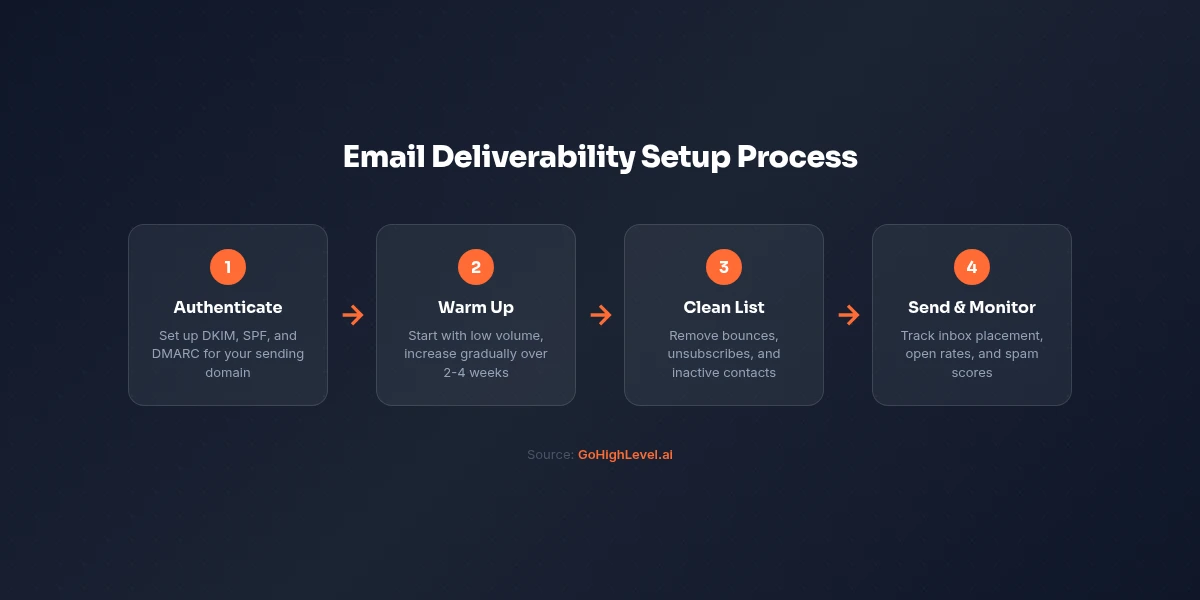
To improve GoHighLevel email deliverability: (1) authenticate your sending domain with DKIM, SPF, and DMARC records, (2) warm up your domain gradually - start with 20-50 emails/day and increase over 4-6 weeks, (3) maintain list hygiene by removing hard bounces immediately, (4) keep your subject lines out of spam trigger patterns, and (5) monitor your sender reputation via Google Postmaster Tools and MXToolbox.
TL;DR
- Email deliverability in GHL depends almost entirely on how well your sending domain is configured - not the platform itself
- Three critical DNS records to set up: DKIM, SPF, and DMARC - all must be configured before sending any volume
- Domain warm-up takes 4–6 weeks and is non-negotiable for new domains or domains new to GHL
- List hygiene (removing hard bounces and inactive contacts) is the second biggest deliverability lever
- GHL uses Mailgun as its default sending infrastructure - a reputable provider with strong IP reputation
EXTENDED FREE TRIAL
Start with 30 days free, not 14.
Use our partner link to get double the standard 14-day trial.
Start Your Free 30-Day Trial →Why Email Deliverability Matters in GoHighLevel
GoHighLevel handles two types of email: transactional (booking confirmations, automated workflow emails, appointment reminders) and marketing (broadcasts, drip campaigns, newsletters). Both rely on the same sending infrastructure - your authenticated domain configured inside GHL.
When GHL users report "emails going to spam" or "low open rates," the cause is almost always one of three things:
- Missing or incorrect DNS authentication records - emails fail SPF, DKIM, or DMARC checks and get filtered or rejected
- Sending to a cold or unwarmed domain - internet service providers do not trust high volumes from new domains
- Poor list hygiene - sending to invalid addresses, spam traps, or consistently unengaged contacts tanks your sender reputation
None of these are GHL platform issues. They are domain and list management issues that apply to any email platform - ActiveCampaign, Mailchimp, and ConvertKit users face the same problems. This guide covers how to solve all three.
Understanding GHL's Email Infrastructure
GoHighLevel routes email through Mailgun by default. Mailgun is an enterprise-grade transactional email provider with strong deliverability infrastructure and dedicated IP pools. The platform also supports SMTP integration with other providers if you want to route through SendGrid, Amazon SES, or your own SMTP server.
When you send from GHL, the email originates from Mailgun's servers but should be authenticated to look like it comes from your domain (yourname@yourdomain.com). The authentication setup is what tells receiving mail servers to trust the message.
Without proper authentication, Gmail and Microsoft 365 treat your email as if it came from an unknown, unauthenticated sender - which means the spam folder.
Step 1: Set Up Your Sending Domain in GoHighLevel
Before sending any email through GHL, you need to add and authenticate a sending domain.
Info
Use a sending subdomain rather than your root domain for marketing email. For example, send from mail.yourdomain.com or news.yourdomain.com instead of yourdomain.com. This separates your marketing email reputation from your root domain, protecting your transactional email deliverability if your marketing campaigns ever generate complaints.
The Three Critical DNS Records
DKIM (DomainKeys Identified Mail)
DKIM adds a cryptographic signature to every email your domain sends. When a recipient's mail server receives your email, it checks the DKIM signature against a public key stored in your DNS. If the signature matches, the email is verified as coming from an authorized sender for your domain.
Without DKIM, your emails look unsigned to receiving servers. This does not guarantee spam filtering, but it raises your risk significantly - especially with Gmail and Microsoft 365, which now heavily weigh DKIM authentication.
In GHL, DKIM is added as a TXT record in your DNS. The exact record is displayed in your Email Services settings once you add your sending domain. Copy it exactly - DKIM records are long and any character error breaks authentication.
SPF (Sender Policy Framework)
SPF tells receiving mail servers which servers are authorized to send email on behalf of your domain. The record lists approved sending infrastructure.
Your SPF record should include Mailgun (GHL's email provider) and any other services you send email from (Google Workspace, Outlook, etc.). A correct SPF record for a domain using GHL looks like:
v=spf1 include:mailgun.org include:_spf.google.com ~all
Important: you can only have one SPF record per domain. If you already have an SPF record, edit it to add include:mailgun.org rather than creating a second record. Multiple SPF records cause email authentication failures.
DMARC (Domain-based Message Authentication, Reporting & Conformance)
DMARC tells receiving servers what to do when an email from your domain fails DKIM or SPF checks. It also provides a reporting mechanism so you can monitor authentication failures.
Start with a p=none policy while you verify your configuration:
v=DMARC1; p=none; rua=mailto:dmarc@yourdomain.com
p=none means "take no action on failed messages, but report them to me." This lets you identify authentication issues without blocking your email. After 2–4 weeks of monitoring with no issues, move to p=quarantine (failed emails go to spam) and eventually p=reject (failed emails are blocked) for maximum protection.
Step 2: Domain Warm-Up - The Most Skipped Step
Domain warm-up is the process of gradually increasing email volume from a new or newly re-activated sending domain. Receiving mail servers are suspicious of domains that suddenly send high volumes of email - this is a common spammer behavior pattern.
If you buy a new domain and immediately send 5,000 marketing emails through GHL, you will almost certainly hit the spam folder or get blocked entirely. Even if every email is legitimate and wanted.
Warm-up schedule for a new GHL domain:
- Week 1: 20–50 emails per day
- Week 2: 100–200 emails per day
- Week 3: 300–500 emails per day
- Week 4: 700–1,000 emails per day
- Week 5: 2,000–3,000 emails per day
- Week 6+: Full volume
During warm-up, send only to your most engaged contacts - people who recently opted in, opened previous emails, or have a strong relationship with your brand. The positive engagement signals (opens, clicks, replies) build your sender reputation and tell mail servers that your domain is trustworthy.
Info
If you are migrating from another email platform (ActiveCampaign, Mailchimp) to GHL, you still need to warm up your GHL sending domain even if the underlying domain is not new. The domain's reputation on Mailgun's infrastructure needs to be established separately.
Step 3: List Hygiene
Your email list is only as good as its quality. Sending to invalid addresses, spam traps, and disengaged contacts damages your sender reputation faster than almost any other factor.
Immediate Actions Before Your First Broadcast
-
Remove hard bounces immediately. A hard bounce means the email address does not exist. GHL tracks bounces automatically - set up automatic suppression of hard bounces in your Email Services settings so they never receive email again.
-
Identify and remove spam traps. Spam traps are email addresses maintained by ISPs and blacklist providers specifically to catch senders using purchased or scraped lists. If your list was purchased, scraped, or has not been mailed in years, consider running it through a list cleaning service (ZeroBounce, NeverBounce, or BriteVerify) before importing to GHL.
-
Segment out cold contacts. Contacts who have not opened any email in 6+ months should be in a separate re-engagement campaign - not in your main broadcast list. Sending to chronically unengaged contacts raises your complaint rate and hurts deliverability for everyone else on your list.
Ongoing List Hygiene Practices
- Suppress hard bounces within 24 hours. GHL has automatic suppression, but verify it is enabled in your account settings.
- Remove chronic non-openers quarterly. Contacts who never open anything in 3–4 consecutive campaigns should be moved to a sunset segment and eventually suppressed.
- Honor unsubscribes immediately. GHL handles this automatically via the unsubscribe link in every email - never manually override unsubscribes.
- Use double opt-in for new subscribers. A confirmation email that requires the subscriber to click a link before joining your list eliminates typos and fake signups, improving list quality from the start.
Start your free 30-day trial through our partner link →
Step 4: Subject Line and Content Best Practices
Authentication and list quality get your email to the spam/inbox decision point. Content influences which side of that line you land on.
Subject Lines to Avoid
Spam filters have evolved far beyond simple keyword blacklists, but these patterns still raise red flags:
- All-caps words: "FREE," "GUARANTEED," "URGENT"
- Excessive punctuation: "!!!," "???"
- Money-forward language without context: "Make $5,000 this week"
- Misleading re: prefixes: "Re: Your request" when there was no previous request
- Deceptive urgency: "Your account has been suspended" when it has not
Good subject lines are specific, honest, and relevant to the recipient's interests. They do not try to trick someone into opening. Deception may boost open rates in the short term but generates complaints that hurt long-term deliverability.
Email Content Signals
- Text-to-image ratio: Emails that are primarily images with little text (a common spam pattern) are treated with suspicion. Aim for at least 60% text content.
- Link-to-text ratio: Emails overloaded with links trigger spam filters. Use links purposefully - one or two clear calls to action per email.
- Physical address: Include a physical mailing address in your email footer. This is required by CAN-SPAM and is a positive signal to mail servers.
- Unsubscribe link: Always present, always functional. GHL adds this automatically - do not remove it.
- HTML quality: Valid, clean HTML renders well and raises fewer flags than broken markup. GHL's email builder generates clean HTML.
Step 5: Monitoring Your Sender Reputation
Once you are actively sending, monitor your sender reputation using these free tools:
Google Postmaster Tools (postmaster.google.com): After sending volume to Gmail addresses, Google Postmaster shows your domain reputation (Good, Medium, Low, Bad), IP reputation, spam rate, and delivery errors. This is the most important monitoring tool for understanding how Gmail specifically treats your email.
MXToolbox (mxtoolbox.com): Run your domain through MXToolbox's email health check to verify DKIM, SPF, and DMARC are properly configured. Also check if your sending IP or domain is on any spam blacklists.
GHL Email Reporting: Inside GoHighLevel, your email campaign and broadcast reports show delivery rate, open rate, click rate, unsubscribe rate, and bounce rate. Watch for open rates below 15% (may indicate inbox placement issues) or bounce rates above 2% (indicates list quality problems).
Common GoHighLevel Email Deliverability Issues and Fixes
Issue: Emails landing in spam despite authentication Fix: Check your spam complaint rate in Google Postmaster Tools. If above 0.1%, you have a list quality or content problem. Segment out unengaged contacts, review your subject lines, and reduce send frequency temporarily.
Issue: "Authentication failed" messages in GHL Fix: DNS changes can take up to 48 hours to propagate. If your records are correct in your domain registrar but still not verifying in GHL, wait 24 hours and try again. Use MXToolbox to confirm the records are visible globally.
Issue: SPF record errors Fix: You may have multiple SPF records (only one is allowed) or the record has too many DNS lookups (limit is 10). Use MXToolbox's SPF checker to diagnose. Consolidate all sending services into one SPF record.
Issue: High bounce rates on broadcast campaigns Fix: Your list likely contains invalid addresses. Run it through ZeroBounce or NeverBounce before sending again. Set GHL to automatically suppress hard bounces (Settings > Email Services > Bounce Handling).
Issue: Low open rates across all campaigns Fix: Low open rates (under 15%) on an authenticated, warmed-up domain often indicate inbox placement issues. Check Google Postmaster for domain reputation. Consider running a seed list test (send to accounts across Gmail, Outlook, Yahoo, and check where it lands) to diagnose placement.
Dedicated IPs in GoHighLevel
By default, GHL (via Mailgun) routes email through shared IP pools - you share sending infrastructure with other GHL users. For most businesses, shared IPs are fine because Mailgun actively manages the pool reputation.
For high-volume senders (100,000+ emails/month), a dedicated IP offers better control over your sending reputation - you are not affected by other senders on the same IP. GoHighLevel does offer dedicated IP options through its Mailgun integration for high-volume accounts.
Most users should not need a dedicated IP - the shared pool is well-managed. If you are experiencing consistent deliverability issues despite correct configuration and list hygiene, a dedicated IP is worth exploring.
👍 GoHighLevel Pros
- ✓Mailgun infrastructure is enterprise-grade with strong deliverability by default
- ✓Full DKIM, SPF, and DMARC support for domain authentication
- ✓Automatic bounce handling and unsubscribe management
- ✓Detailed campaign reporting for open rate, bounce rate, and click tracking
- ✓SMTP integration option for users who prefer SendGrid or Amazon SES
👎 Cons
- ✗Domain warm-up required for new domains - cannot send high volume immediately
- ✗Shared IP pool means other GHL users' behavior can marginally affect your reputation
- ✗No built-in list cleaning tool - need third-party ZeroBounce or NeverBounce
- ✗DMARC monitoring requires a separate tool (Google Postmaster, Dmarcian) for full visibility
Related Resources
- Read our guide on automation workflows
- Read our guide on SMS marketing capabilities
- Read our guide on GoHighLevel pricing breakdown
- Visit the GoHighLevel official site
- Visit the Litmus email deliverability best practices
Frequently Asked Questions
Why are my GoHighLevel emails going to spam?
What is DKIM and why does it matter for GoHighLevel?
Does GoHighLevel use Mailgun?
How long does domain warm-up take for GoHighLevel?
What is a good email open rate in GoHighLevel?
Can I use a custom SMTP with GoHighLevel?
How do I check if my GoHighLevel emails are authenticated?
What causes a high bounce rate in GoHighLevel?
EXTENDED FREE TRIAL
Start with 30 days free, not 14.
Use our partner link to get double the standard 14-day trial.
Start Your Free 30-Day Trial →Ashley Kemp is a digital entrepreneur and perpetual traveller. Switched from ClickFunnels to GoHighLevel years ago and never looked back. Writing about what actually works.
Was this article helpful?