GoHighLevel Voice AI 2026: GPT-5 Mini & Real Test
10 min read · Updated May 2026
What is GoHighLevel Voice AI and how much does it cost?
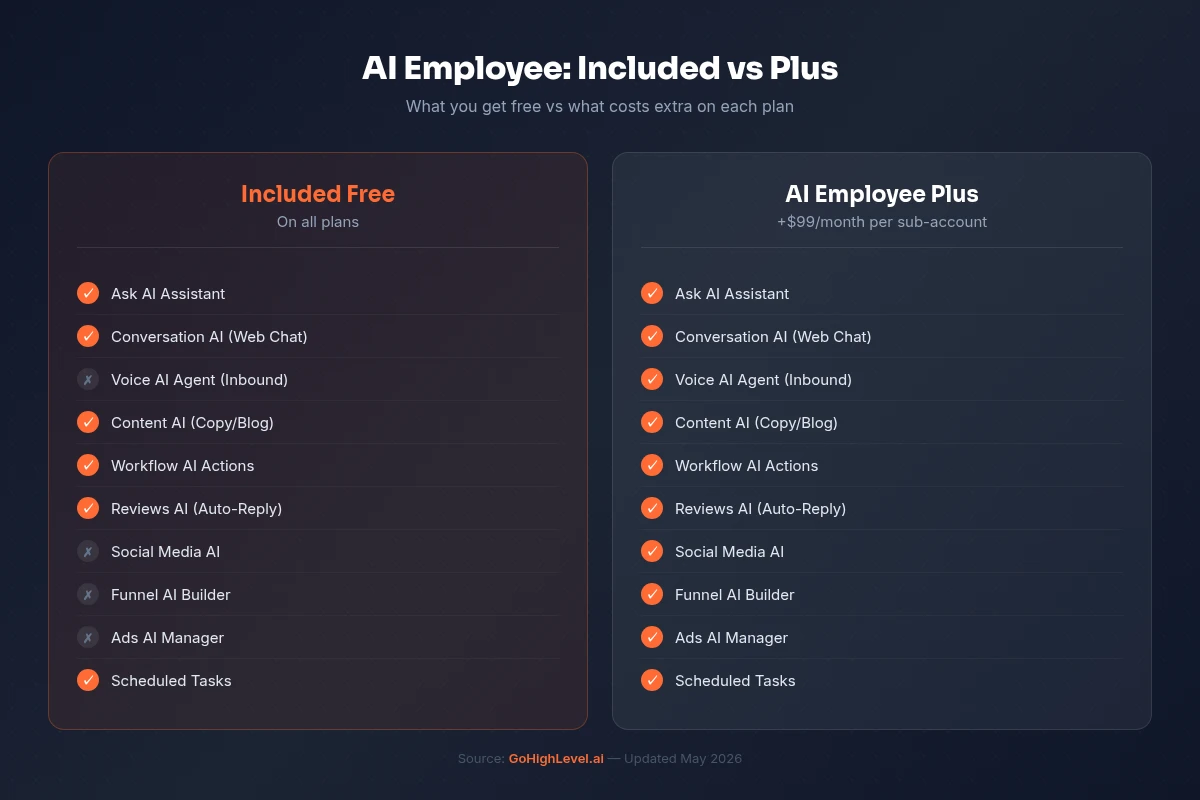
GoHighLevel Voice AI is an autonomous phone agent that answers inbound calls, qualifies leads, books appointments, and transfers to humans when needed. All without human involvement. It uses GPT-5 Mini for sub-600ms response latency. Pricing is approximately $0.163/minute on pay-per-use (voice engine + LLM tokens), or included in the AI Employee unlimited plan at $97/month per sub-account for inbound calls. Outbound Voice AI is billed separately under AI Employee Plus.
Voice AI is the GoHighLevel feature that genuinely replaces a human role. Not "assists" or "augments". Replaces. A properly configured Voice AI agent handles inbound calls indistinguishably from a trained receptionist. It answers questions, qualifies leads, checks your calendar in real-time, books appointments, and routes calls to humans when it's out of its depth.
I've watched this evolve from robotic and stilted to genuinely conversational over the past year. The 2026 updates. GPT-5 Mini, sub-600ms latency, existing number support, custom voice profiles, and knowledge base integration. Pushed it past the threshold where most callers can't tell they're talking to AI.
This guide covers the current state of Voice AI, how to set it up properly, what it actually costs, and the practical lessons from agencies deploying it for real clients.
EXTENDED FREE TRIAL
Start with 30 days free, not 14.
Use our partner link to get double the standard 14-day trial.
Start Your Free 30-Day Trial →What Changed in 2026
The Voice AI that exists today is materially different from what shipped in late 2024. Here's what's new:
GPT-5 Mini integration. Voice AI now runs on OpenAI's latest model with multiple voice options. The intelligence gap between Voice AI responses and a well-trained human receptionist has closed significantly. Complex multi-turn conversations. Handling objections, answering detailed questions, managing interruptions. Work reliably.
Sub-600ms response latency. This is the single most important improvement. The previous generation had noticeable pauses between the caller speaking and the AI responding. At sub-600ms, the conversation flows naturally. Callers don't notice they're talking to AI unless the conversation goes off-script.
Existing business number support. You can now assign Voice AI to your existing business phone number. Previously, you needed a separate number for AI calls. This removes the biggest deployment friction. Clients don't need to change their published phone number.
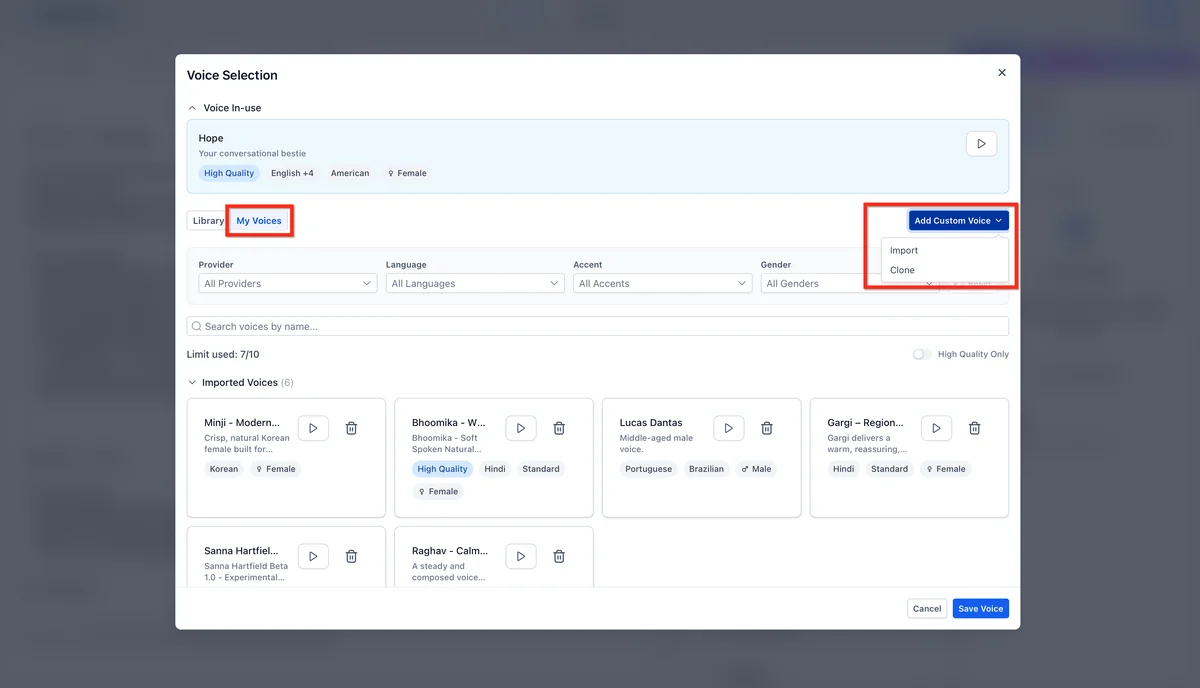
Custom voice profiles. Select from a library of voice types and adjust tone, speed, and accent parameters. Each client can have a unique-sounding AI that matches their brand. A law firm gets a different voice than a dental practice.
Knowledge base and call flow. Connect your knowledge base directly to Voice AI. Upload FAQs, service descriptions, pricing sheets, and business policies. Write call scripts that guide the conversation. The AI references your actual business data instead of making things up.
Voice AI Orb Widget. A visual widget that visitors can click to start a voice conversation directly from your website. Not a chat widget: a full voice interaction in the browser.
Voice AI performance reports. Now available in Labs. Track call volume, duration, booking rates, transfer rates, and caller sentiment across all Voice AI interactions.
Setting Up Voice AI
Step 1: Enable Voice AI
Navigate to AI Agents, then Voice Agents in your sub-account. Create a new voice agent. If you haven't enabled the AI Employee, you'll need to turn it on in Agency Settings first.
Step 2: Configure Your Voice
Select a voice profile from the library. Test multiple options. Some sound more natural than others for different contexts. Consider the industry (warm and friendly for hospitality, professional and measured for legal), regional preferences, and typical call duration.
Set your initial greeting to match the brand: "Thanks for calling [Business Name], this is [Agent Name], how can I help you today?" A natural greeting sets the tone for the entire call.
Step 3: Build Your Knowledge Base
This is where most people underinvest and then wonder why their Voice AI gives bad answers. Upload everything the agent might need to reference during a call:
- Service descriptions with pricing
- Business hours and location details
- Common FAQs (the real ones, not the ones you wish people asked)
- Appointment types and durations
- Insurance or payment policies
- Team member names and specialties
The more context you provide, the fewer hallucinated responses you'll get. A Voice AI agent without a knowledge base is like hiring a receptionist and not telling them anything about the business.
Step 4: Write Your System Prompt
Switch to Advanced Mode for the system prompt. Structure it as:
Persona: "You are [name], the AI receptionist for [business]. You're friendly, professional, and knowledgeable about our services."
Core rules: What the agent should always do (greet warmly, confirm the caller's name, ask how you can help) and what it should never do (discuss competitors, make promises about outcomes, quote prices not in the knowledge base).
Booking rules: Which calendar to check, what information to collect before booking (name, service type, preferred time), and what to say if no slots are available.
Escalation triggers: When to transfer to a human. Explicit request, three unanswered questions, complaint keywords, emergency situations.
Keep the prompt focused. Under 500 words with specific instructions outperforms a 2,000-word novel. The AI needs rules, not context about the history of your industry.
Step 5: Connect Your Calendar
Link the calendar you want appointments booked into. Consider creating a dedicated calendar for AI-booked appointments if you want to track conversion separately. Configure available slots, buffer times, and booking confirmation messages.
Step 6: Assign a Phone Number
You can either assign Voice AI to your existing business number or create a dedicated number. Using your existing number means all inbound calls go through Voice AI first. It handles what it can and transfers what it can't.
For testing, start with a separate number. Once you're confident, move to the business number.
Step 7: Set Up Post-Call Workflows
Configure workflow triggers for after Voice AI calls complete. Common post-call actions:
- Tag the contact with "Voice AI Qualified" or "Voice AI Transfer"
- Add to the appropriate pipeline stage
- Send a booking confirmation via SMS
- Notify the team via Slack or internal notification
- Create a follow-up task if the caller didn't book
Start your free 30-day trial through our partner link →
What Voice AI Actually Costs
Voice AI pricing has two layers on pay-per-use:
Voice engine charge: The base cost for running the call (~$0.06/minute).
LLM token processing: The AI reasoning cost, which varies by conversation complexity. Simple FAQ calls use fewer tokens than complex multi-turn qualification conversations.
The platform average across all Voice AI usage is approximately $0.163/minute. A typical 3-minute inbound call costs roughly $0.50.
At scale: An agency with 10 clients each receiving 200 inbound calls per month at an average of 3 minutes = 6,000 voice minutes. At $0.163/minute, that's approximately $978/month in Voice AI costs.
The unlimited plan alternative: AI Employee unlimited at $97 per sub-account x 10 sub-accounts = $970/month with no per-minute caps on inbound Voice AI. At 200+ calls per client per month, the unlimited plan breaks even almost immediately.
What's NOT included in the unlimited plan: Voice AI Outbound (AI-initiated calls), the Voice AI Widget (the orb for websites), and the Voice AI Prompt Optimizer. These remain under AI Employee Plus and are billed per use regardless of your plan.
Phone and SMS carrier charges through LC Phone or Twilio are always billed separately. The AI Employee plan covers the AI processing, not the telecom costs.
Real Deployment Tips From Agency Experience
Start with after-hours only. Don't go all-in on day one. Configure Voice AI to handle calls outside business hours first. This lets you test with real callers while having a human safety net during working hours. Once you're confident, expand to overflow during peak periods, then consider full-time deployment.
Monitor transfer rates. A high transfer rate (over 30%) means your knowledge base or prompt needs work. The goal is handling 70-80% of calls autonomously, transferring the genuinely complex ones.
Record and review calls. Listen to actual Voice AI conversations weekly, especially in the first month. You'll find specific questions or scenarios the agent handles poorly. Fix them by updating your knowledge base or adding rules to the system prompt.
Don't try to make it close deals. Voice AI excels at qualification, information delivery, and appointment booking. It's not a closer. Let the AI handle the first interaction, qualify the lead, book the meeting, and hand off to a human for the sales conversation.
Train on real objections. Upload at least 20 real customer objections from your call history. Generic FAQ training produces generic responses that drop accuracy below 70%. Real objections with specific answers produce an agent that sounds like it's been working at the business for months.
Who Should Deploy Voice AI
Service businesses missing calls. Dental offices, HVAC companies, law firms, med spas, salons. Any business where missed calls equal lost revenue. If you're sending 20% of inbound calls to voicemail, Voice AI pays for itself immediately.
Agencies building recurring revenue. Package Voice AI as an "AI Receptionist" service at $200-$400/month. Your cost is $97 (AI Employee unlimited) plus carrier fees. The margin funds your agency growth.
Businesses with after-hours demand. If customers call after 5 PM and get voicemail, you're losing them. Voice AI operates 24/7 with zero overtime cost.
Not ideal for: Businesses where every call requires deep human empathy (grief counselling, certain medical contexts) or highly regulated industries where AI responses carry compliance risk.
EXTENDED FREE TRIAL
Start with 30 days free, not 14.
Use our partner link to get double the standard 14-day trial.
Start Your Free 30-Day Trial →For building custom multi-step voice workflows, see our Agent Studio tutorial. For full AI Employee pricing and packaging, see the AI Employee guide.
Frequently Asked Questions
Can GoHighLevel Voice AI book appointments during phone calls?
Does Voice AI work with my existing business phone number?
How fast does GoHighLevel Voice AI respond during calls?
Is Voice AI included in the GoHighLevel AI Employee plan?
What languages does GoHighLevel Voice AI support?
Ashley Kemp is a digital entrepreneur and perpetual traveller. Switched from ClickFunnels to GoHighLevel years ago and never looked back. Writing about what actually works.
Was this article helpful?