GoHighLevel Agent Studio: Build AI Agents (2026)
11 min read · Updated May 2026
What is GoHighLevel Agent Studio?
Agent Studio is GoHighLevel's visual, no-code builder for creating custom AI agents. Using a drag-and-drop canvas, you design how an agent gets triggered, processes information, makes decisions, and takes actions, like booking appointments, qualifying leads, or responding to customer inquiries. Agents can connect to knowledge bases, web search, third-party APIs, and GoHighLevel's CRM data. It's available on all GHL plans, with usage billed under the AI Employee Plus tier.
Agent Studio is the feature that separates GoHighLevel from every other CRM platform in 2026. While other tools let you set up chatbots with canned responses, Agent Studio lets you build genuinely autonomous AI workers that reason, make decisions, and take multi-step actions inside your CRM.
I've been building agents in Agent Studio since it launched, and the jump from Conversation AI (rules-based chatbot) to Agent Studio (agentic AI with tools and logic) is massive. It's the difference between a phone tree and a real assistant.
This tutorial walks through everything: the builder interface, node types, knowledge bases, templates, deployment, and how to connect your agents to Ask AI. If you've never touched Agent Studio, you'll have a working agent by the end.
EXTENDED FREE TRIAL
Start with 30 days free, not 14.
Use our partner link to get double the standard 14-day trial.
Start Your Free 30-Day Trial →Agent Studio vs Conversation AI vs Ask AI
Before building, you need to understand which tool does what. People mix these up constantly.
Conversation AI is a trained chatbot. You give it your business information, FAQs, and booking rules. It responds to incoming messages on SMS, web chat, and social channels. It's reactive. It waits for a message, then replies. Great for lead qualification and after-hours responses. Simple to set up but limited in what it can do.
Agent Studio is a visual builder for creating custom AI agents. These agents can reason through complex tasks, use multiple tools, access knowledge bases and external APIs, and take autonomous actions. An Agent Studio agent can search your CRM, check calendar availability, generate personalised content, and book an appointment. All in one interaction. More powerful but more complex to build.
Ask AI is GoHighLevel's built-in AI workspace. It handles direct requests from you or your team. Generating content, answering questions, running scheduled tasks. Agent Studio agents can be mapped to Ask AI so that when someone types a relevant prompt, Ask AI routes it to your custom agent automatically.
The relationship: Agent Studio agents are the brain. They can be deployed through Conversation AI channels (SMS, chat, social) or through Ask AI (internal team use). You build the agent once, then choose where it shows up.
The Agent Studio Interface
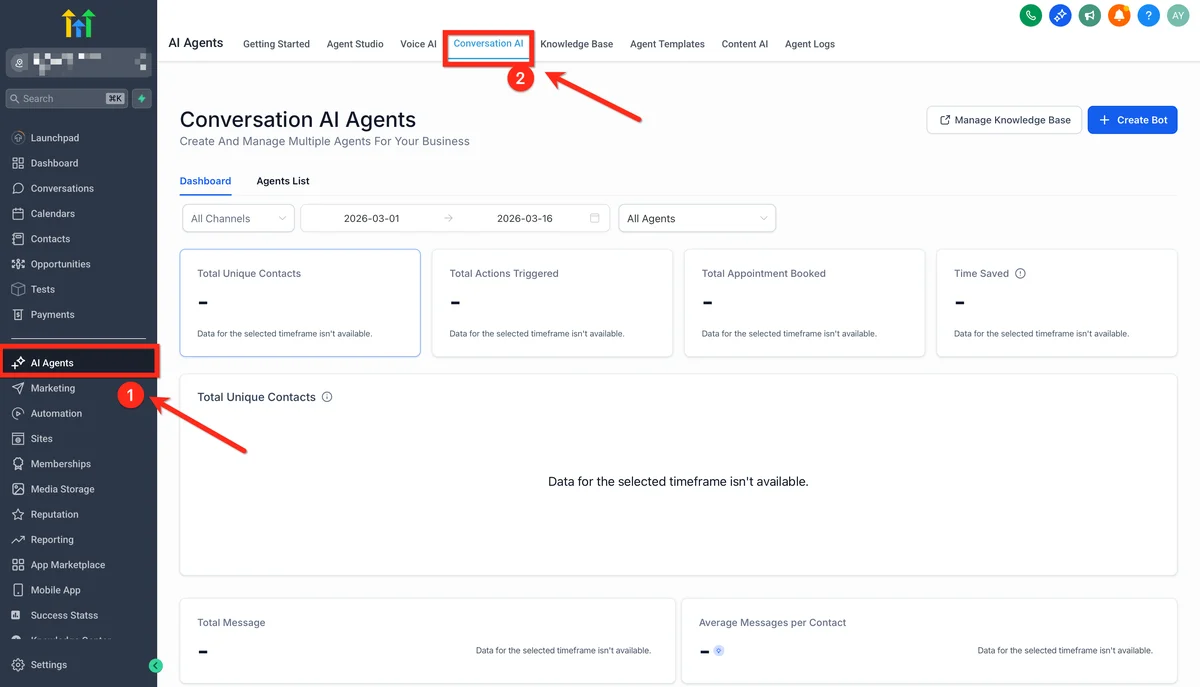
Navigate to AI Agents, then Agent Studio in your sub-account. You'll see the canvas: a visual workspace where you design your agent's logic flow.
The canvas works like a flowchart. You place nodes, connect them with lines, and define how data flows between steps. Every agent starts with a trigger and ends with an output.
Node Types
LLM/Prompt Nodes: The core reasoning node. You write instructions telling the AI what to do, what persona to adopt, and what tools it can use. This is where the agent's intelligence lives. You choose the model (GPT-5 Mini is recommended for most use cases) and define the system prompt.
Tool Nodes: Give your agent access to actions. Search the knowledge base, perform web searches, call external APIs, create contacts, send messages, check calendar availability. Each tool node is configured independently with its own parameters.
Capture Nodes: Collect structured input from the user. Text fields, choices, dates, numbers. These are used when the agent needs specific information before proceeding, like asking for a name, selecting a service, or confirming a date.
Conditional Routing: Branch the flow based on logic. If the lead is high-value, take path A; if low-value, take path B. Supports if/else conditions based on variables, conversation context, or tool outputs.
Knowledge Base Nodes: Connect your agent to uploaded documents, FAQs, pricing sheets, and service descriptions. The agent uses retrieval-augmented generation (RAG) to find relevant information before responding. This is how you keep responses accurate and grounded in your actual business data rather than generic AI knowledge.
Building Your First Agent: An Appointment Booking Bot
Let's build something practical: an AI agent that qualifies leads, checks calendar availability, and books appointments. This is the single most requested agent type for service businesses.
Step 1: Create a new agent. In Agent Studio, click "Create New Agent." Give it a name like "Booking Agent" and a description of what it does.
Step 2: Configure the trigger. Set the trigger to fire when the agent is invoked. Either through a Conversation AI channel or via Ask AI.
Step 3: Add the system prompt. This is the most important step. Your system prompt defines the agent's personality, rules, and behaviour. Keep it under 500 words. Structure it as:
- Role: "You are [name], the AI booking assistant for [business]. You help potential clients book appointments."
- Rules: "Always ask for the client's name and preferred service before checking availability. If the requested time isn't available, suggest the next three available slots. Never discuss pricing. Redirect pricing questions to the team."
- Escalation: "If the client asks to speak to a human, immediately transfer the conversation. If you can't answer a question after two attempts, escalate."
Step 4: Add tool nodes. Give the agent the tools it needs: a Knowledge Base tool (with your services, FAQs, and business hours), a Calendar tool (to check availability and book), and a Contact tool (to create or update the lead record).
Step 5: Add capture nodes. Insert capture steps for required information. Client name, service type, preferred date/time. The agent asks these naturally within the conversation.
Step 6: Test. Agent Studio has a built-in Test tab. Run through a sample conversation. Check that the agent asks the right questions, finds availability correctly, and books the appointment. Adjust the prompt based on test results.
Step 7: Deploy. Move the agent from Staging to Production. Now you can connect it to Conversation AI channels or map it to Ask AI.
Start your free 30-day trial through our partner link →
Connecting Agent Studio to Ask AI
This is how your internal team accesses custom agents through a conversational interface.
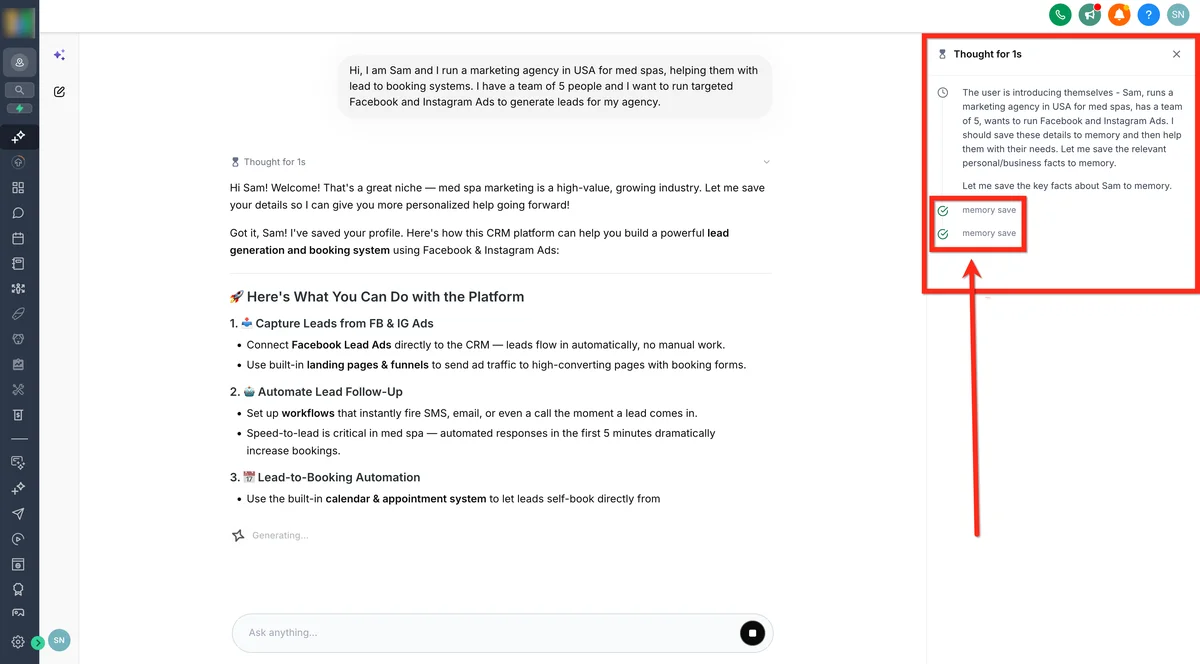
Go to Settings, then Ask AI, then Agent Mapping. Click "Map Agent" and select your Agent Studio agent. Add a plain-language description of the agent's capabilities. For example, "Books appointments, checks calendar availability, and creates contact records for new leads."
Ask AI evaluates every user prompt against these descriptions. When someone types "Book an appointment for John Smith next Tuesday," Ask AI recognises the intent and routes it to your booking agent automatically.
For each input variable in your agent, you choose whether to pre-fill it with a system value or ask the user at runtime. This flexibility means the same agent can work in fully automated mode (pre-filled variables from CRM data) or interactive mode (asking the user for input).
The Template Library
You don't have to build every agent from scratch. Agent Studio includes a Template Library with pre-built agents for common use cases:
- Lead qualification bots that ask qualifying questions and score leads
- Appointment booking agents with calendar integration
- Review request agents that ask for reviews after completed services
- FAQ responders trained on your knowledge base
- Stale deal follow-up agents that re-engage cold opportunities
Templates are starting points. Clone one, customise the prompt, connect your tools, and deploy. Most agencies can go from template to production agent in under an hour.
Pricing: AI Employee Plus
Agent Studio falls under AI Employee Plus pricing. It's not included in the $97/month AI Employee unlimited plan. Agent Studio usage is billed on a pay-per-use basis based on model token consumption at API pricing.
For most agents handling routine conversations, costs are modest. A simple booking agent processing 50 conversations per day might cost $5-15/month in token usage depending on conversation length and model choice.
GPT-5.2 (Low thinking) is recommended for most use cases. It balances quality and speed. Use higher thinking levels for complex logic, and GPT-5 Nano for simple tasks where speed and cost matter most.
For a complete breakdown, see our AI Employee pricing guide.
Advanced: Multi-Agent Systems
Agent Studio supports orchestrating multiple agents within a single workflow. Each agent handles a specific domain. One for booking, one for billing questions, one for technical support, and the system routes to the right agent based on the user's intent.
This is where Agent Studio moves from "chatbot builder" to "AI workforce platform." An agency can build a library of specialised agents, deploy them across all client sub-accounts, and create a genuine AI-powered service offering.
Export and import functionality lets you share agents between sub-accounts. Build once, deploy everywhere.
Tips From Building Real Agents
Keep system prompts focused. Under 500 words with specific rules. Vague prompts produce vague responses. "Be helpful" is useless. "If the user asks about pricing, respond with: our service starts at $X for [basic service]. For custom quotes, offer to book a consultation.". That's useful.
Test with edge cases. What happens when someone asks about something your agent can't handle? What if they give incomplete information? What if they're rude? Test the unhappy paths, not just the happy ones.
Use the knowledge base aggressively. Upload everything: your services, pricing, FAQs, common objections, business hours, team bios. The more context the agent has, the fewer hallucinated responses you'll get.
Start simple. Your first agent should do one thing well. Don't build a 20-node multi-agent system on day one. Get a booking bot working, prove the value, then expand.
Monitor execution logs. Agent Studio provides run logs showing exactly what the agent did, which tools it called, and what it returned. Review these regularly. They reveal where the agent struggles and where prompts need tightening.
EXTENDED FREE TRIAL
Start with 30 days free, not 14.
Use our partner link to get double the standard 14-day trial.
Start Your Free 30-Day Trial →For connecting external AI models to your GHL data, see our MCP Server guide. To configure voice-based AI agents, check the Voice AI 2026 guide. For pricing context, see AI Employee pricing.
Frequently Asked Questions
Is GoHighLevel Agent Studio included in the AI Employee plan?
What is the difference between Agent Studio and Conversation AI in GoHighLevel?
Can I use Agent Studio agents with Ask AI?
What AI models does Agent Studio support?
Can I share Agent Studio agents across GoHighLevel sub-accounts?
Ashley Kemp is a digital entrepreneur and perpetual traveller. Switched from ClickFunnels to GoHighLevel years ago and never looked back. Writing about what actually works.
Was this article helpful?