HubSpot to GoHighLevel Migration Guide (2026)
22 min read · Updated May 2026
Can you migrate from HubSpot to GoHighLevel?
Yes - migrating from HubSpot to GoHighLevel is fully achievable. You export your GoHighLevel CRM featuress and deal data as CSV files, document your workflows and email sequences, then rebuild everything inside GoHighLevel. Most agencies complete the full switch in 2–4 weeks using GHL's 30-day free trial as their migration window. The average saving is $500–$900/month.
TL;DR
- Every core HubSpot feature has a GHL equivalent - CRM, pipelines, email marketing, automations, landing pages, forms, and calendars all map directly to GoHighLevel tools
- Use the 30-day free trial as your migration window - it gives you enough time to import data, rebuild automations, test everything, and go live before spending a cent
- Agencies typically save $766/month or more - HubSpot Marketing Pro + add-ons costs $1,000+/month vs GoHighLevel Unlimited at $297/month flat
EXTENDED FREE TRIAL
Start with 30 days free, not 14.
Use our partner link to get double the standard 14-day trial.
Start Your Free 30-Day Trial →New in May 2026: Native HubSpot Integration
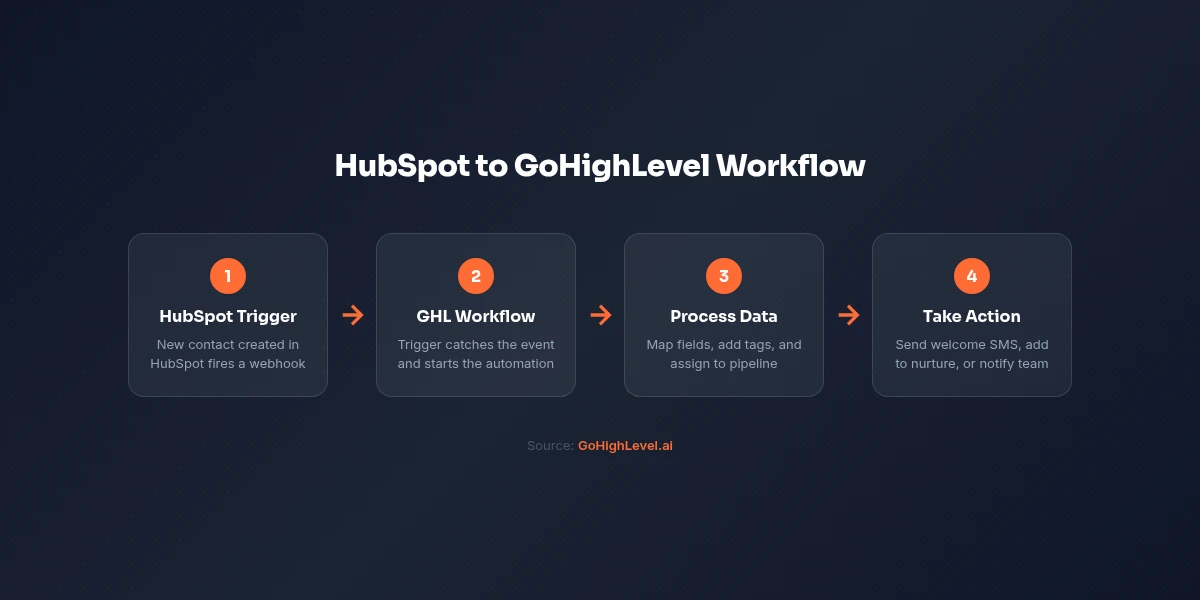
Before we get into the full export-and-import process, it's worth knowing that the migration story has changed. GoHighLevel now has a native HubSpot integration built directly into the Workflow Builder. See our complete HubSpot integration guide for the full setup walkthrough.
What this means for your migration:
- You can run both platforms simultaneously. New contacts created in HubSpot automatically trigger GHL workflows. No Zapier, no middleware, no polling delays.
- Bidirectional contact sync is native. GHL workflows can create and find contacts in HubSpot using built-in actions with full custom property support.
- The parallel-run period is smoother. Instead of a hard cutover, you can gradually shift operations to GHL while HubSpot stays active. New leads flow into both systems automatically.
- Authentication is simple. OAuth-based setup in Settings → Integrations → HubSpot, or inline from any workflow action.
What it doesn't do yet: the native integration handles contact operations only. Deal stage triggers, ticket events, and pipeline sync are on the roadmap but not available today. For anything beyond contacts, you'll still need Zapier or custom API work during the transition.
This is a solid start. For most agencies, contact sync is the critical piece during migration, and that's now native. The full export-and-rebuild process below is still the right approach for a complete migration, but the native integration makes the transition period significantly less stressful.
Why People Switch from HubSpot to GoHighLevel
HubSpot is a genuinely good platform. It pioneered inbound marketing, built one of the best CRMs in the business, and has an enormous ecosystem of integrations. If you are a large enterprise with a dedicated RevOps team and a six-figure marketing budget, HubSpot earns its price tag.
But for agencies, consultants, and small-to-mid-size businesses? The math stopped making sense.
HubSpot's Pricing Problem
HubSpot's free tier is a masterclass in lead generation. It gives you just enough to get hooked, then requires an aggressive jump to access anything production-ready.
Here is what HubSpot actually GoHighLevel pricings in 2026:
- Free - basic CRM, limited forms and email, 2,000 email sends/month
- Starter - $20/month, removes HubSpot branding, basic automation (single-step)
- Professional - $800/month, full marketing automation, A/B testing, custom reporting, Salesforce integration
- Enterprise - $3,600/month, custom objects, advanced permissions, predictive lead scoring
That jump from Starter ($20) to Professional ($800) is a 40x price increase. And Professional is the minimum plan where HubSpot becomes a real marketing platform. Most growing businesses find themselves either trapped on Starter with crippled GoHighLevel automation workflows or paying $800/month-plus for features they only partially use.
The Hidden Cost of HubSpot
The list price is just the beginning. HubSpot's pricing model layers costs in ways that catch users off guard.
Per-seat pricing. HubSpot charges per user on most paid tiers. Add your sales reps, VA, and operations person, and you are suddenly paying per head - on top of an already expensive base.
Contact tier limits. Marketing Hub pricing scales with your contact count. At 10,000 contacts you pay one price; at 50,000 contacts you pay significantly more. As your list grows, so does your bill.
No native SMS. HubSpot does not include SMS marketing. You need a third-party integration - typically an add-on or a separate tool like Twilio - which adds both cost and complexity.
No white-label. HubSpot's branding appears on emails, forms, and landing pages unless you pay for Professional or higher. There is no way to resell HubSpot under your own brand. Agencies cannot build a productized service on top of it.
No sub-account model. Every client gets their own HubSpot account. Every account is billed separately. Agencies managing 10 clients pay for 10 accounts, or attempt complicated workarounds that HubSpot did not design for.
Why Agencies Specifically Hate HubSpot's Model
GoHighLevel was built specifically for the agency use case. The frustrations that drive agencies away from HubSpot - per-seat pricing, no white-label, no SMS, no sub-accounts - are exactly what GoHighLevel solved from day one.
GoHighLevel Unlimited at $297/month includes:
- Unlimited sub-accounts (one per client)
- Unlimited users at no extra cost
- Native SMS and email from one platform
- White-label capability - sell GHL under your own brand
- Phone system, two-way calling, voicemail drops
- Full CRM, pipeline management, and conversation inbox
For any agency managing more than two or three clients, the cost comparison becomes obvious.
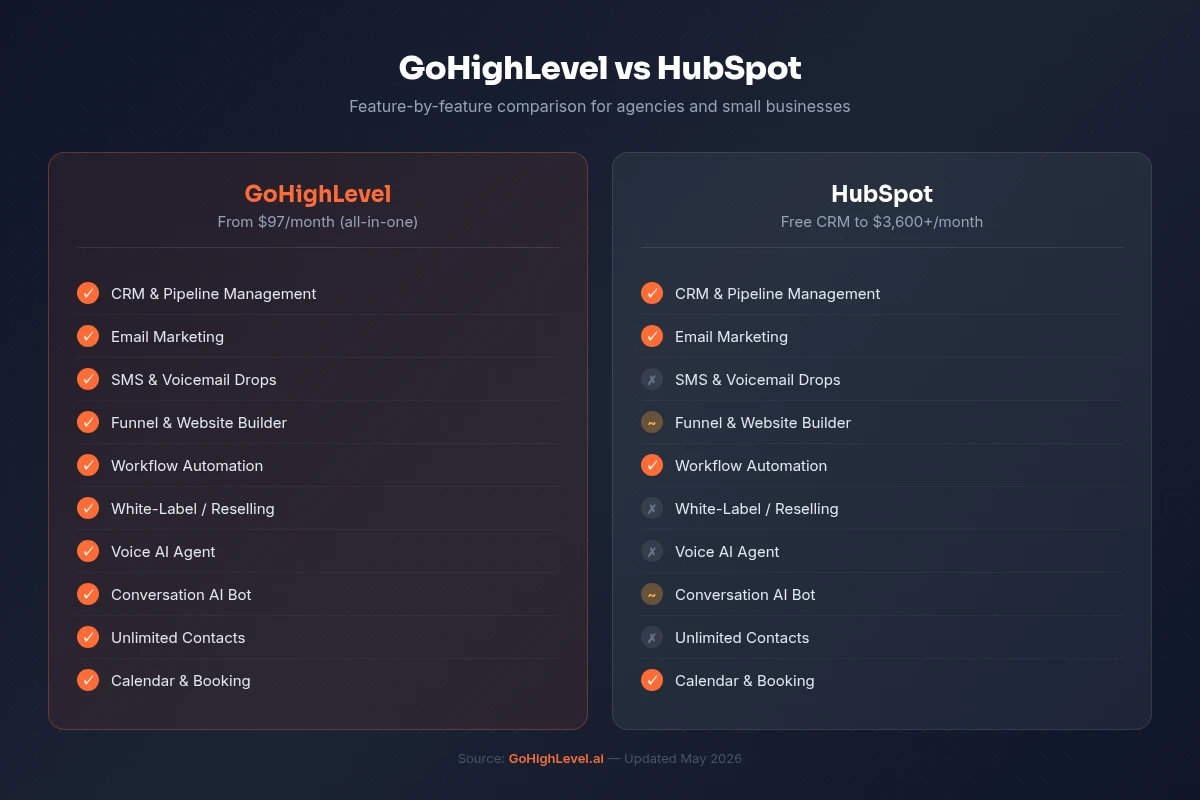
HubSpot vs GoHighLevel: Cost Comparison
| Plan | HubSpot | GoHighLevel |
|---|---|---|
| Entry Level | Free (limited) | Starter - $97/month |
| Mid-Tier | Starter - $20/month (very limited automation) | Unlimited - $297/month |
| Growth | Professional - $800/month | Pro - $497/month |
| Enterprise | Enterprise - $3,600/month | Included in Pro |
| SMS Marketing | Not included (add-on/3rd party) | Included in all plans |
| Sub-Accounts / Clients | Separate account per client | Unlimited sub-accounts (Unlimited+) |
| White-Label | Not available | Available on Unlimited+ |
| Per-Seat Pricing | Yes - extra per user | No - unlimited users |
| Contact Limits | Yes - tiered pricing by contact count | Unlimited contacts |
| Built-in Phone / Dialer | No | Yes - included |
| Funnel Builder | Landing pages only (Pro+) | Full funnel builder |
| Course / Membership | No | Yes - included |
| Reputation Management | No | Yes - included |
What HubSpot Features Map to GoHighLevel
Before you migrate, it helps to know exactly where your HubSpot assets land in GoHighLevel. Nothing gets left behind - every core feature has a direct equivalent.
| HubSpot Feature | GoHighLevel Equivalent | Notes |
|---|---|---|
| HubSpot CRM | GHL CRM + Contacts | Full contact records, custom fields, tags, activity history |
| HubSpot Deals / Pipelines | GHL Opportunities + Pipelines | Drag-and-drop pipeline stages, weighted probability |
| HubSpot Workflows | GHL Workflows (Automation) | Multi-step, multi-channel - email, SMS, voice, webhooks |
| HubSpot Sequences | GHL Email Campaigns / Workflows | Sequence-style drip campaigns with wait steps |
| HubSpot Email Marketing | GHL Email Marketing | Unlimited sends, drag-and-drop builder, templates |
| HubSpot Landing Pages | GHL Funnel Builder | Full drag-and-drop pages + A/B testing |
| HubSpot Forms | GHL Forms + Surveys | Embeddable forms, conditional logic, trigger automations |
| HubSpot Meetings / Scheduling | GHL Calendar / Appointments | Round-robin, group booking, sync to Google Calendar |
| HubSpot Live Chat | GHL Live Chat Widget | Site widget + unified conversation inbox |
| HubSpot Reporting | GHL Reporting + Dashboards | Attribution reporting, custom dashboards |
| HubSpot Social Publishing | GHL Social Planner | Multi-channel scheduling and publishing |
| HubSpot Knowledge Base | GHL Memberships / Communities | Documentation and resource portals |
| HubSpot Email Tracking | GHL Conversation Inbox | Two-way email, SMS, and call tracking in one inbox |
Before You Migrate: Audit Your HubSpot Account
Do not start exporting data until you have a clear picture of what you have. A migration audit takes a few hours and saves you significant rework later.
Run Through This Checklist
Contacts and lists
- How many total contacts do you have?
- Which lists are active and being used in automations?
- What custom properties have you created?
- Which contacts have associated deals or activities?
Deals and pipelines
- How many open deals are in your pipeline?
- How many pipeline stages do you have, and what are they called?
- Are deal stages connected to workflow triggers?
Workflows and automations
- List every active workflow with its trigger, conditions, and actions
- Note which workflows send emails, update properties, or notify your team
- Identify any workflows that depend on HubSpot-specific integrations
Email assets
- How many active email sequences do you have?
- Which email templates do you use regularly?
- What are your current open rates and click rates? (Export this for benchmarking.)
Landing pages and forms
- List every active landing page and its conversion rate
- Identify forms embedded on your website
- Note any thank-you pages or redirect logic
Integrations
- What third-party tools connect to HubSpot? (Stripe, Google Ads, Facebook Ads, Salesforce, Zapier)
- Which integrations are critical to daily operations?
Step-by-Step: How to Migrate from HubSpot to GoHighLevel
This is the full migration process used by agencies who have made the switch. Allow 2–4 weeks for a thorough migration. Use GoHighLevel's 30-day free trial as your migration window - you will have the platform fully live before you need to decide whether to stay.
Step 1: Start Your 30-Day GoHighLevel Trial
Go to GoHighLevel and start your free 30-day trial. There's no charge during the trial. Cancel anytime before it ends. Choose the Unlimited plan trial - it gives you access to sub-accounts, which you will need if you are migrating client data.
During the trial, set up your:
- Agency account name and branding
- Default time zone and business information
- Stripe integration (for payments, if applicable)
- Custom domain (for landing pages and funnels)
Do not cancel HubSpot yet. You will run both platforms in parallel until everything is verified.
Step 2: Export Your HubSpot Contacts
In HubSpot, navigate to Contacts → All Contacts. Click Export in the top-right corner and select all contact properties you want to carry over.
Include at minimum:
- First name, last name, email, phone
- Company name, job title
- All custom properties
- Lead status and lifecycle stage
- Contact owner
- Last activity date
- Any notes or important fields
HubSpot exports contacts as a CSV file. Download it and save it somewhere safe - this is your primary data asset.
Pro tip: Before exporting, clean your list. Remove contacts with invalid email addresses, duplicates, and anyone who has unsubscribed or bounced. A clean import saves you hours of cleanup inside GoHighLevel.
Step 3: Export Your Deal and Pipeline Data
Navigate to CRM → Deals in HubSpot. Use the same export function to download your deal records.
Your deal export should include:
- Deal name and value
- Pipeline stage
- Associated contact and company
- Close date
- Deal owner
- Custom deal properties
Export your companies separately if you use the Companies object heavily. GoHighLevel's CRM uses a contact-centric model, so companies become tags or custom fields rather than a separate object.
Step 4: Document Your Workflows Before Leaving
This is the step most people skip, and the one they regret most.
In HubSpot, go to Automation → Workflows and open every active workflow. For each one, create a simple document (a Google Doc or Notion page works fine) that records:
- Trigger: what starts the workflow (form submission, contact property change, deal stage change, etc.)
- Enrollment criteria: any filters applied
- Every action in order: send email, wait X days, update property, assign owner, etc.
- The email content used in each send step
Also document your sequences in HubSpot's Sales Hub. These are the sales-specific email cadences that are different from marketing workflows.
This documentation becomes your blueprint for rebuilding in GoHighLevel.
Step 5: Import Contacts into GoHighLevel
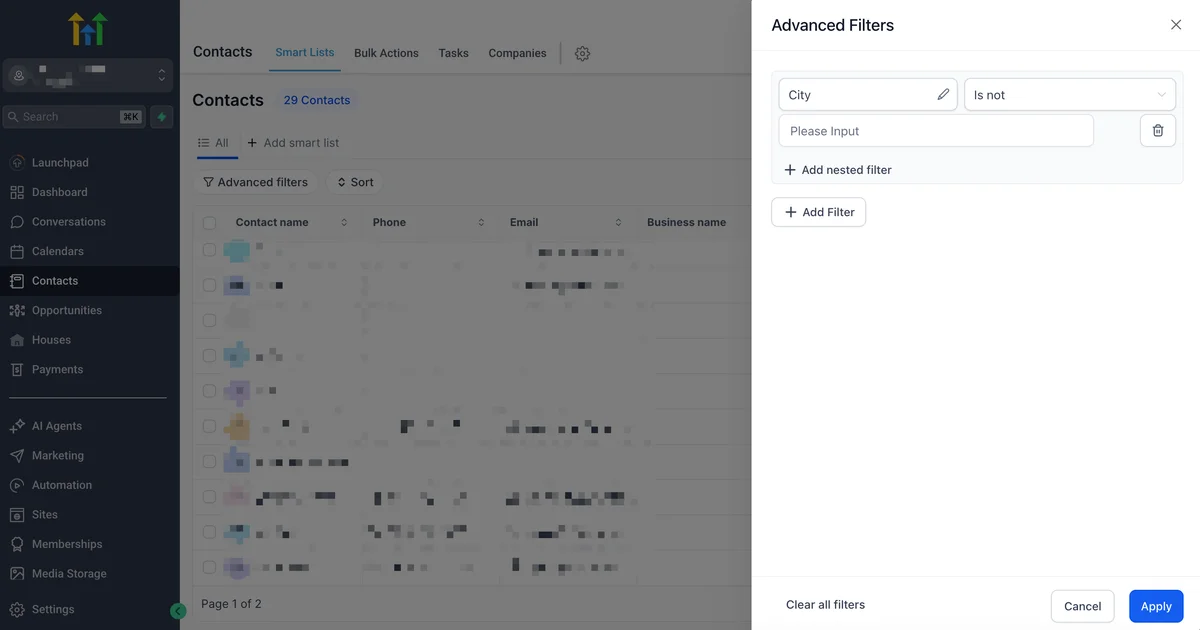
In GoHighLevel, navigate to Contacts → Import. Upload your cleaned CSV file.
GHL's import wizard walks you through field mapping - connecting the columns in your CSV to the corresponding fields in GoHighLevel. Map:
- Email → Email
- First/Last Name → First Name / Last Name
- Phone → Phone (ensure E.164 format for SMS eligibility)
- Custom fields → Custom fields you pre-create in GHL
Create any custom fields you need in Settings → Custom Fields before importing, so they are ready to receive data during the import.
After import, apply tags to segment your contacts the same way HubSpot's lists did. Tags in GoHighLevel function like list membership - you can trigger automations, send campaigns, and filter contacts by tag.
Step 6: Rebuild Your Pipelines in GoHighLevel
Navigate to CRM → Pipelines and create a new pipeline. Name your stages to match what you had in HubSpot. If you had a pipeline called "Sales Pipeline" with stages Prospect → Qualified → Proposal Sent → Negotiation → Closed Won/Lost, recreate that exactly.
Once your pipeline stages are set, import your open deals. You can do this manually for smaller volumes, or use GoHighLevel's bulk import to create opportunities from a CSV.
For each opportunity, assign:
- Pipeline stage
- Monetary value
- Associated contact
- Expected close date
- Opportunity owner
Step 7: Recreate Your Email Sequences as GHL Workflows
This is the most time-consuming step - and also where GoHighLevel actually gives you more power than HubSpot, once you learn the builder.
For each workflow you documented in Step 4:
- Go to Automation → Workflows → + New Workflow
- Choose your trigger (form submission, tag applied, appointment booked, etc.)
- Add actions in order: send email, wait, check condition, send SMS, assign user, update contact field
- Copy your email content from the HubSpot export into GHL's email editor
- Test the workflow with a test contact before activating
GoHighLevel's workflow builder supports conditions, branching logic, and multi-channel actions (email + SMS + voice in the same workflow). HubSpot Professional required workarounds to achieve this. In GHL, it is native.
Step 8: Rebuild Landing Pages and Forms
In GoHighLevel, go to Sites → Funnels to rebuild your landing pages. The drag-and-drop builder supports custom HTML/CSS, pre-built sections, and responsive design.
For forms, go to Sites → Forms and rebuild each form to match your HubSpot forms. Connect each form to a workflow trigger so submissions automatically enroll contacts in the right automation.
If your HubSpot landing pages are embedded on a WordPress or external site, update the embed codes once your GHL versions are live. Do this one page at a time and verify conversions before cutting over fully.
Step 9: Set Up Your Integrations
Reconnect the tools that were previously integrated with HubSpot:
- HubSpot (native). Connect in Settings → Integrations → HubSpot via OAuth. This enables the native contact sync: new HubSpot contacts automatically trigger GHL workflows, and GHL actions can create or find contacts in HubSpot. If you're running both platforms in parallel during migration, set this up first. It keeps contacts flowing between systems without middleware. Note: the native integration currently handles contacts only; for deal or ticket sync, use Zapier.
- Stripe - connect in Settings → Integrations for payment processing and invoicing
- Google Ads - connect for lead form ad integration and conversion tracking
- Facebook / Instagram Ads - connect for Lead Ads and retargeting
- Google Calendar - sync with GHL's calendar for appointment management
- Zapier - still useful for advanced use cases beyond what native integrations cover (deal sync, ticket events, custom object mapping). Update existing zaps to point to GHL triggers and actions.
GHL also has a native integration with Google My Business for reputation management - something HubSpot does not offer at all.
Step 10: Run Parallel for 30 Days, Then Cancel HubSpot
For the first 30 days, keep HubSpot active while running GoHighLevel in parallel. This is your safety net, and the native HubSpot integration makes this period much smoother than it used to be.
During this period:
- Enable the native HubSpot integration so new contacts sync automatically between platforms. No manual re-entry or Zapier dependency for basic contact flow
- Route all new leads into GoHighLevel, not HubSpot
- Monitor that automations fire correctly in GHL
- Track email deliverability and open rates
- Verify that all form submissions are captured
- Confirm that pipeline data is accurate and up to date
At the end of 30 days, if everything is working, cancel your HubSpot subscription. Do not cancel before you have confirmed that GHL is handling your business correctly.
How Long Does HubSpot to GHL Migration Take?
The timeline depends on how complex your HubSpot setup is. Here is a realistic breakdown:
| Account Complexity | Migration Time |
|---|---|
| Fewer than 5,000 contacts, 1–2 workflows | 3–5 days |
| 5,000–25,000 contacts, 5–10 workflows, multiple pipelines | 1–2 weeks |
| 25,000+ contacts, 15+ workflows, many landing pages | 3–4 weeks |
| Large agency migrating multiple client accounts | 4–6 weeks |
The 30-day GoHighLevel trial is perfectly sized for most migrations. Start on day 1, have everything live by day 20, use days 21–30 for parallel testing, then cancel HubSpot when your trial converts.
What GoHighLevel Does Better Than HubSpot (for Agencies)
Once the migration is done, these are the areas where most switchers say GoHighLevel clearly wins.
Native SMS and Two-Way Messaging
GoHighLevel has SMS built into every plan. You can send broadcast SMS campaigns, include SMS steps in any workflow, and handle two-way SMS conversations in the unified inbox. For agencies doing lead generation or appointment setting, this alone often pays for the platform - HubSpot requires a third-party integration and additional spend to achieve the same result.
Sub-Account Model for Client Management
GoHighLevel's Unlimited plan lets you create unlimited sub-accounts - one per client. Each sub-account is a fully isolated GHL environment with its own contacts, pipelines, workflows, and billing. You manage all clients from one agency dashboard. HubSpot has no equivalent. Each client requires a separate HubSpot account with its own subscription.
White-Label Reselling
On GHL's Unlimited plan and above, you can white-label the entire platform - custom domain, custom logo, custom name, custom color scheme. Your clients log into what appears to be your proprietary software. This lets agencies build a productized CRM service on top of GHL and charge a recurring fee. HubSpot explicitly does not allow white-labeling.
Built-in Phone System and Dialer
GoHighLevel includes a power dialer, call recording, voicemail drops, and call tracking inside the platform. Sales reps can call prospects directly from the CRM without a separate tool like CallRail or Aircall. HubSpot requires third-party integrations for any phone functionality.
Flat, Predictable Pricing
GoHighLevel does not penalize you for growing. Your price is the same whether you have 100 contacts or 100,000. Whether you have 2 users or 20. HubSpot's pricing model charges you for success - more contacts, more users, more features all drive the bill higher. GHL's model is the opposite.
Course and Membership Sites
GoHighLevel includes a native membership site and online course builder. HubSpot has no equivalent. Agencies and coaches who want to deliver digital products can do it without another tool.
What HubSpot Does Better (Honest Assessment)
A credible comparison requires honesty. HubSpot genuinely excels in several areas.
Native Salesforce integration. HubSpot's bidirectional Salesforce sync is best-in-class. For organizations that live in Salesforce, HubSpot connects more cleanly than GHL does today. If your company runs on Salesforce, this matters.
Content management and SEO tools. HubSpot's Content Hub (formerly CMS Hub) includes a full website CMS, SEO recommendations, content strategy tools, and pillar page workflows. GoHighLevel is not a CMS. If content marketing at scale is your primary growth channel, HubSpot's content tools are more mature.
Enterprise reporting and attribution. HubSpot's Enterprise reporting goes deep - custom attribution models, cross-object reporting, revenue attribution by campaign. GoHighLevel's reporting has improved significantly but is not yet at HubSpot Enterprise's level for complex attribution analysis.
For most agencies and small-to-mid businesses, these advantages are outweighed by the cost difference. But they are real, and you should evaluate them honestly against your specific situation.
FREE TRIAL
Get 30 Days Free With Our Partner Link
- ✓Full access for 30 days
- ✓No charge during the trial
- ✓Cancel any time
Join 2.2 million businesses already running on GoHighLevel
Cost Savings Calculator: HubSpot vs GoHighLevel
This is the math that makes most HubSpot users finally switch. Run the numbers for your own stack:
Typical Agency on HubSpot Professional
| Tool | Monthly Cost |
|---|---|
| HubSpot Marketing Professional | $800 |
| HubSpot Sales Hub Starter (2 seats) | $40 |
| Twilio SMS (for what HubSpot lacks) | $100 |
| Calendly Pro (scheduling) | $16 |
| ClickFunnels or Unbounce (landing pages) | $147 |
| CallRail (call tracking) | $45 |
| Total | $1,148/month |
Same Agency on GoHighLevel Unlimited
| Tool | Monthly Cost |
|---|---|
| GoHighLevel Unlimited (everything above, included) | $297 |
| Total | $297/month |
Monthly savings: $851 Annual savings: $10,212
Even if you are on HubSpot Starter and paying far less, the feature gap means you are likely paying for tools HubSpot does not include. GoHighLevel users consistently report saving $400–$900/month when they consolidate their full stack.
Common HubSpot to GoHighLevel Migration Mistakes
Avoid these errors - they are the ones that cause delays and frustration.
Migrating Dirty Data
Your HubSpot database almost certainly has duplicate contacts, invalid email addresses, and stale records that have not engaged in years. If you import all of that into GoHighLevel, you carry the mess with you. Before exporting, run a data cleaning pass: remove hard-bounced emails, merge duplicates, and delete contacts who have been inactive for more than 24 months.
A smaller, cleaner list delivers better email deliverability and lower costs. It also makes your GHL workflows more accurate.
Not Documenting Workflows Before You Start
Rebuilding a workflow you cannot fully remember is painful. The HubSpot workflow builder shows you every step visually - but once you cancel your account, that access is gone. Document every active workflow in detail before you start exporting data. Screenshots are not enough; write down the logic explicitly.
Cancelling HubSpot Too Early
Wait until GoHighLevel has been fully live for at least two weeks before cancelling HubSpot. You want to see actual leads flowing through your new automations, actual emails sending, actual appointments booking. If you cancel HubSpot on day one and something breaks in GHL, you have no fallback.
Skipping the Field Mapping Step
GoHighLevel's field names do not automatically match HubSpot's property names. If you import without mapping, data lands in the wrong fields or gets lost entirely. Take time before import to create all custom fields in GHL and carefully match every column in your export CSV to the correct destination field.
Going Live Without Testing Automations
Every workflow you rebuild in GHL needs to be tested with a real contact before you switch traffic to it. Use a personal email address as a test contact, enroll it manually in each workflow, and confirm that every email, SMS, wait step, and conditional branch fires correctly. A workflow that fires incorrectly in production can result in contacts getting wrong messages or no messages at all.
Related Articles
EXTENDED FREE TRIAL
Start with 30 days free, not 14.
Use our partner link to get double the standard 14-day trial.
Start Your Free 30-Day Trial →Related Resources
- Visit the GoHighLevel official site
- Visit the GoHighLevel support documentation
Frequently Asked Questions
Can I migrate from HubSpot to GoHighLevel?
How do I export my contacts and data from HubSpot?
How much does it cost to migrate from HubSpot to GoHighLevel?
Will I lose my HubSpot contact history when I migrate?
Is GoHighLevel's CRM as good as HubSpot's?
How long does a HubSpot to GoHighLevel migration take?
Ashley Kemp is a digital entrepreneur and perpetual traveller. Switched from ClickFunnels to GoHighLevel years ago and never looked back. Writing about what actually works.
Was this article helpful?