GoHighLevel SaaS Mode & White Label: The Complete 2026 Guide
19 min read · Updated April 2026
What is GoHighLevel SaaS Mode and white label?
GoHighLevel white label lets you rebrand the platform with your logo, domain, and colors - available on the Unlimited plan ($297/mo) and above. SaaS Mode, available on the SaaS Pro plan ($497/mo), goes further: it lets you create and sell your own subscription SaaS product powered by GoHighLevel, complete with automated client onboarding, rebilling, and a white-label mobile app in the App Store and Google Play under your brand.
TL;DR
- White label is available from the $297/mo Unlimited plan - custom domain, logo, and colors for your agency portal
- SaaS Mode is the $497/mo upgrade - turns GHL into your own resellable SaaS product with automated billing, sub-account creation, and a branded mobile app
- The ROI math is simple: charge clients $297/mo, break even at 2 clients, profit from client 3 onward
EXTENDED FREE TRIAL
Start with 30 days free, not 14.
Use our partner link to get double the standard 14-day trial.
Start Your Free 30-Day Trial →What is GoHighLevel SaaS Mode?
GoHighLevel SaaS Mode transforms the platform from a tool you use for GoHighLevel for agencies into a product you sell to them. Instead of logging into "GoHighLevel" to manage their marketing, your clients log into "YourBrand.com" - powered entirely by GoHighLevel infrastructure, branded entirely as your own.
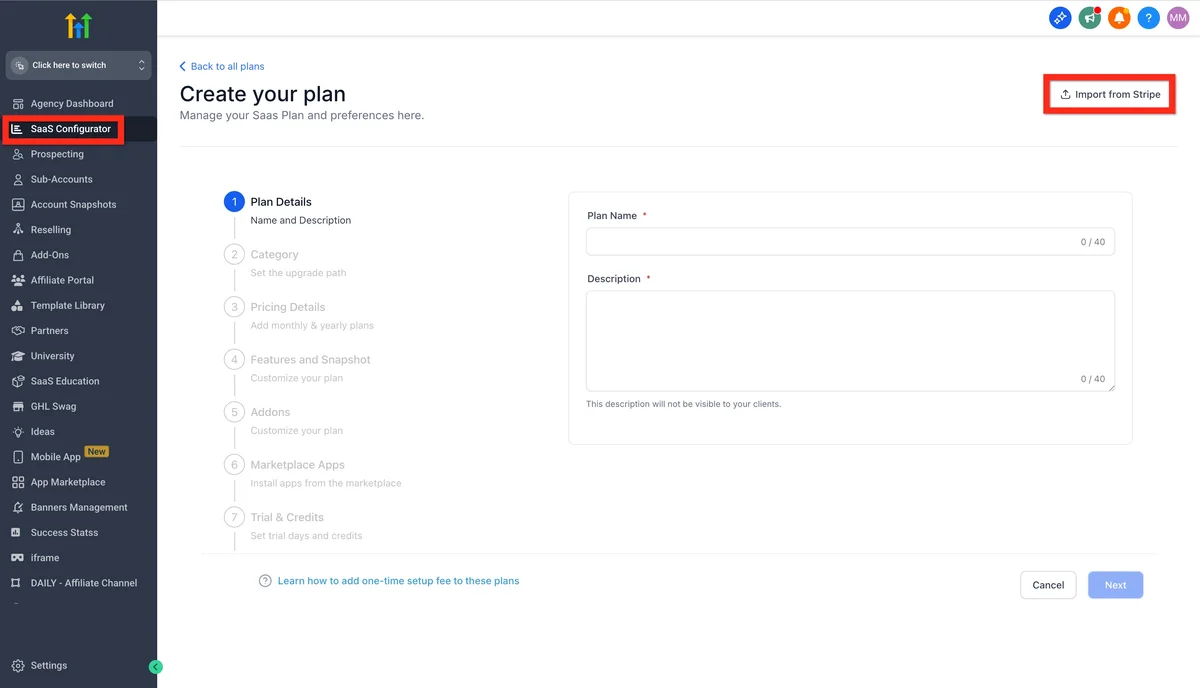
This is not just a logo swap. SaaS Mode on the $497/mo SaaS Pro plan includes the full machinery for running a legitimate software business: tiered pricing plans you define, automated Stripe billing, instant sub-account creation when clients sign up, and a GoHighLevel white label guide mobile app published in the App Store and Google Play under your company name.
The distinction matters when you are pitching clients. You are not a GoHighLevel reseller - you are a SaaS founder. Your clients never need to know what powers the back end. They buy "YourBrand CRM" and see your brand everywhere: the login page, the dashboard, the mobile app on their phone, and the emails they receive from you.
For agency owners, this unlocks a revenue model that is fundamentally different from traditional client services. Monthly recurring revenue from software subscriptions is more predictable, more scalable, and typically commands higher valuations than service revenue. GoHighLevel's SaaS Mode is the fastest path to that model without building anything from scratch.
Regular GoHighLevel vs SaaS Mode: The Core Difference
On the standard Unlimited GoHighLevel agency pricing, you manage clients inside your own GoHighLevel account. You do the work. Clients may or may not have logins. The relationship is agency-to-client.
On SaaS Mode, clients are autonomous software users who manage their own sub-accounts. You set the tools they can access, price the plans, and collect recurring payments. The relationship becomes platform-to-customer. You are the software company.
White Label vs SaaS Mode: What's the Difference?
These two terms are often used interchangeably but they describe different levels of branding and capability. Here is the exact difference:
| Feature | Unlimited Plan ($297/mo) | SaaS Pro Plan ($497/mo) |
|---|---|---|
| Custom agency domain | Yes | Yes |
| Custom logo and colors | Yes | Yes |
| Unlimited client sub-accounts | Yes | Yes |
| White-label desktop portal | Yes | Yes |
| White-label mobile app (iOS + Android) | No | Yes |
| SaaS pricing tiers (define your own plans) | No | Yes |
| Automated Stripe rebilling | No | Yes |
| Auto sub-account creation on signup | No | Yes |
| Client-facing checkout / onboarding flow | No | Yes |
| Per-client custom domains | No | Yes |
| AI Employee (conversation AI per sub-account) | No | Yes |
| Phone/email rebilling with markup | No | Yes |
The short version: white label (Unlimited, $297/mo) makes GHL look like your product. SaaS Mode (SaaS Pro, $497/mo) makes GHL function like your product - with real billing, real automation, and a real mobile app in the app stores.
If you manage clients hands-on and want to look professional, the Unlimited plan is sufficient. If you want to build a self-serve software business where clients sign up, pay, and onboard themselves, you need SaaS Mode.
GoHighLevel SaaS Mode Pricing
The SaaS Pro plan costs $497 per month. That is the only plan that includes SaaS Mode. Here is exactly what you are paying for:
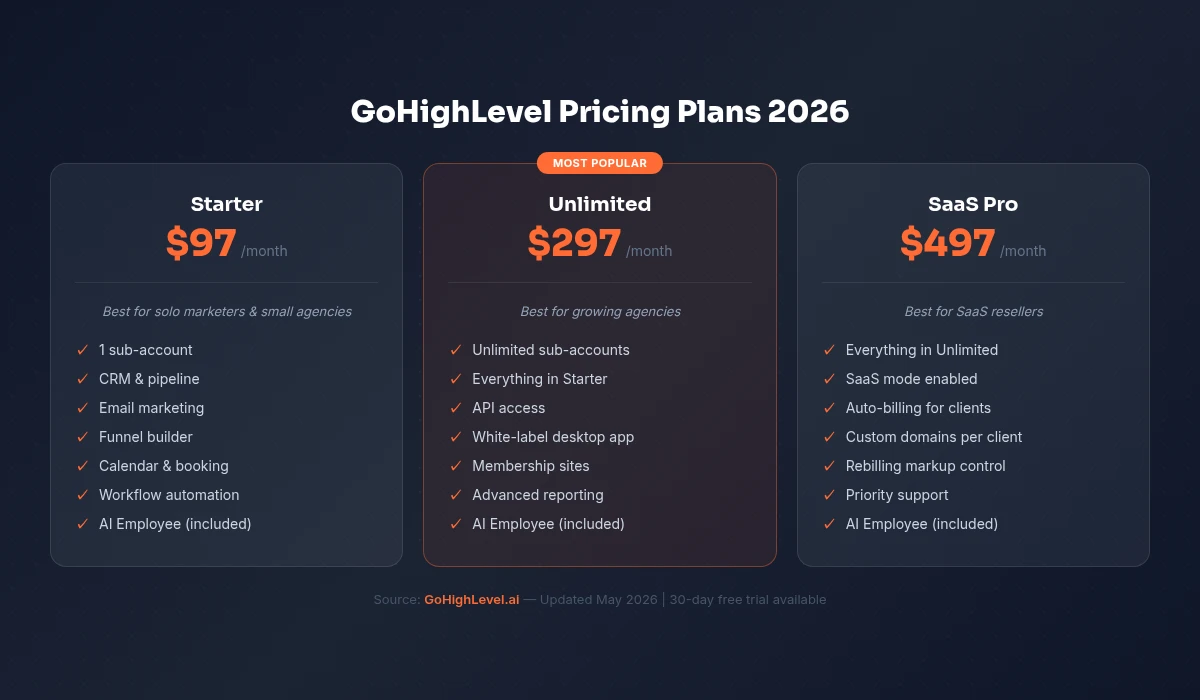
What the $497/mo Includes
- Everything in the Unlimited plan ($297/mo value)
- Full SaaS Mode with unlimited reseller sub-accounts
- White-label mobile app (iOS + Android) published under your brand
- Automated Stripe integration for client billing
- Configurable pricing tiers you define (e.g. Basic / Pro / Agency)
- Rebilling for LC Phone, LC Email, LC Premium Triggers, and AI with your own markup
- Per-sub-account custom domain support
- GoHighLevel's ongoing infrastructure, updates, and new feature releases
- Priority support access
The ROI Math
This is where GoHighLevel SaaS Mode becomes one of the most attractive business models available to agency owners.
You pay $497/mo. Your clients pay you. Let us run the numbers:
Break-even scenario: Charge clients $297/mo per seat. You cover your platform cost with 2 clients. Every client after that is pure margin.
Conservative growth: 10 clients at $297/mo = $2,970/mo revenue, $2,473/mo profit after platform cost.
Mid-tier scenario: 20 clients at $197/mo (entry-level plan) = $3,940/mo. 20 clients at $297/mo = $5,940/mo. Both cover your cost with massive margin.
Aggressive SaaS build: 50 clients at $147/mo = $7,350/mo. Your cost is $497. Margin is 93%.
The overhead that kills traditional SaaS businesses - servers, development, maintenance, security - does not apply here. GoHighLevel handles all infrastructure. Your cost stays flat at $497/mo regardless of whether you have 5 clients or 500.
The only variable costs are usage-based: LC Phone calls, LC Email sends, and AI usage get billed through your Stripe account at a markup you control. Set the markup at 20-30% and rebilling itself becomes a profit center.
What Can You White Label in GoHighLevel?
White label in GoHighLevel is comprehensive. Here is what you can brand as your own:
Desktop App and Agency Portal
Your GoHighLevel account becomes your branded platform on a custom domain. Clients log into app.yourbrand.com instead of app.gohighlevel.com. The login page, dashboard, navigation, and all UI elements reflect your agency's colors and logo.
You control:
- Domain: any subdomain or custom domain you own
- Logo: full replacement at every touchpoint in the platform
- Colors: primary, secondary, and accent colors across the UI
- Agency name: shown to clients throughout their experience
- Support links: point to your help docs, not GoHighLevel's
- Chat widget: your own support contact, not GHL support
Clients never see GoHighLevel branding. They see yours.
White-Label Mobile App (SaaS Pro Only)
This is one of GoHighLevel's most powerful - and underutilized - differentiators. On the SaaS Pro plan, you can publish a fully white-labeled iOS and Android app under your company name in the official app stores.
Your clients search for "YourBrand" in the App Store, download your app, and manage their contacts, pipelines, conversations, and calendar entirely from your branded mobile experience. The app icon, name, splash screen, and in-app branding are all yours.
There is an additional fee for the mobile app white-label ($497 setup + monthly fee depending on the tier). GoHighLevel handles the App Store and Google Play submission, review cycles, and updates. You own the listing and the brand identity.
For agencies pitching enterprise or multi-location clients, a branded mobile app is a credibility multiplier that traditional SaaS companies charge tens of thousands to build.
Client Portal
Each sub-account functions as a client portal. Clients log into your branded platform and see their own CRM, conversations, pipeline, calendar, and reports. The experience is self-contained - they are using software, not being managed by an agency.
You control exactly which features appear in each client's account. Lock certain sections, enable specific tools per pricing tier, and configure the default dashboard to show what matters most to that client type.
Email Sender Identity
All system emails sent through your platform - onboarding, notifications, reports, password resets - come from an email address at your domain. Clients receive email from hello@yourbrand.com, not from any GoHighLevel address.
Configure your SMTP settings, set the sender name and email, and maintain brand consistency across every automated touchpoint.
How to Set Up GoHighLevel White Label (Step-by-Step)
Getting white label active takes less than an hour on your first setup. Here is the full process:
Step 1: Upgrade to the Unlimited Plan ($297/mo)
White label requires the Unlimited plan or higher. Log into your GoHighLevel account and navigate to the billing section to upgrade. The 30-day free trial gives you access to test white-label settings before committing.
Step 2: Connect Your Custom Domain
In your agency settings, go to Agency Settings > General > Company Domain. Enter the subdomain you want clients to use (e.g., app.youragency.com). Then go to your domain registrar (GoDaddy, Cloudflare, Namecheap, etc.) and add a CNAME record pointing to GoHighLevel's servers. DNS propagation takes 15 minutes to a few hours.
Step 3: Upload Your Logo and Set Brand Colors
In Agency Settings > General, upload your logo in PNG format (transparent background recommended, minimum 200px wide). Set your primary brand color using the hex code. This color appears in buttons, highlights, and UI accents throughout the platform.
Step 4: Configure Your Agency Profile
Set your agency name, support email, support phone, and support URL. These appear to clients when they need help. If you have a help desk or knowledge base, link to it here rather than GoHighLevel's official support.
Step 5: Customize the Login Page
In Agency Settings, configure your login page background - either a solid color, custom image, or your agency's marketing visual. Add a custom headline and subtext. This is the first thing new clients see when they receive their login link.
Step 6: Set Up Email Notifications
Connect your sending domain in Agency Settings > Email Services. This ensures all automated platform emails (welcome, password reset, notifications) come from your domain. Follow the SPF, DKIM, and DMARC setup instructions GoHighLevel provides - this is essential for deliverability.
Step 7: Test the Client Experience
Create a test sub-account and log in as if you were a client. Navigate through the dashboard, check the mobile view, and send yourself a test automated email. Verify that every GoHighLevel brand reference has been replaced with your own.
How to Set Up SaaS Mode
SaaS Mode requires the SaaS Pro plan ($497/mo). Once upgraded, here is the setup process:
Create Your Pricing Tiers
In Agency Settings > SaaS Configuration, you define the pricing plans you will sell to clients. Most agencies create 2-4 tiers. A common structure:
- Starter - $97/mo: CRM, email, SMS, calendar, basic automations
- Growth - $197/mo: Everything in Starter + funnels, landing pages, reputation management
- Pro - $297/mo: Everything in Growth + full automation, reporting, API access
- Agency - $497/mo: Everything + white label, unlimited seats
For each tier, configure exactly which GoHighLevel features are enabled. SaaS Mode gives you granular feature gating - turn on and off specific tools per plan level.
Connect Stripe for Automated Billing
In your SaaS settings, connect your Stripe account. Once connected, when a new client signs up and selects a plan, GoHighLevel automatically creates the Stripe subscription, charges the client's card, and provisions their sub-account - all without you lifting a finger.
Set your billing settings: monthly or annual cycles, trial periods for new signups (offer 14 days or mirror GHL's own 30-day trial), and cancellation policies.
Configure the Client Onboarding Flow
SaaS Mode includes a configurable signup page and onboarding flow. Clients visit your signup URL, choose a plan, enter their payment details, and get instant access to their branded sub-account. GoHighLevel handles provisioning automatically.
Customize the onboarding with:
- Welcome email sequence triggered on signup
- Pre-built snapshot loaded into their account (give new clients a head start with templates)
- Onboarding checklist shown in their dashboard
- First-login walkthrough or video tutorial
Enable Rebilling
Rebilling lets you charge clients for usage-based services at a markup. In SaaS Config, enable rebilling for LC Phone, LC Email, and any premium triggers. Set your markup percentage - 20-30% is standard.
GoHighLevel bills you at cost. You bill clients at your marked-up rate. The difference is pure profit. For high-volume clients (e.g., a home services company sending 10,000 SMS/month), rebilling alone can generate $50-200/mo per client in additional margin.
How to Sell GoHighLevel as a Agency Product
The technical setup is the easy part. Building a profitable SaaS business on GoHighLevel requires positioning, pricing strategy, and a defined niche.
Positioning: You Are Not Reselling GHL
The agencies that struggle to sell GHL as SaaS make one mistake: they position it as "GoHighLevel." The agencies that win position it as their own vertical SaaS solution.
"GoHighLevel" means nothing to a plumber, a gym owner, or a real estate team. "ContractorCommand - the all-in-one CRM for home service businesses" means everything.
Your white-label product should have:
- A name that speaks to your niche
- A domain that matches (contractorcommand.com, gymgrowthOS.com)
- Marketing copy that addresses specific pain points of that niche
- Onboarding templates pre-loaded for that industry's workflows
- Case studies from clients in that niche
This is the niche SaaS model, and it is the fastest path to growing a GoHighLevel-powered business.
Pricing Strategy
The right pricing depends on your niche and what you include. Here are three proven structures:
The DIY Tier Model - Offer 2-3 self-serve plans ($97-$297/mo) with no agency involvement. Clients sign up, use the platform, and pay monthly. Your role is support and product improvement. Works well for tech-savvy niches (e-commerce, coaches, consultants).
The Done-For-You Layer - Offer a base SaaS tier ($147-$297/mo) with optional DFY setup packages ($500-$2,000 one-time). The software subscription builds MRR. The setup packages fund your agency operations. Best for local business niches (contractors, restaurants, health & wellness).
The All-Inclusive Retainer - Bundle the platform with ongoing management (content, ads, reputation) at $497-$997/mo. The platform cost is bundled in. Clients see one monthly price for everything. Highest per-client revenue, highest churn risk if results lag.
Niche SaaS Examples Built on GoHighLevel
- DentistOS - CRM, review management, appointment booking, and patient reactivation for dental practices
- GymFlow - Lead capture, SMS follow-up, trial-to-membership automations for fitness studios
- AgentEdge - Pipeline tracking, listing alerts, and buyer/seller automations for real estate agents
- ShopCRM - Customer loyalty, SMS campaigns, and appointment booking for retail boutiques
- CoachCommand - Onboarding, course delivery, scheduling, and billing for business coaches
Each of these is a GoHighLevel white-label deployment with niche-specific templates, terminology, and positioning. None of them say "GoHighLevel" anywhere.
Go-to-Market for Your SaaS
Once your platform is live, here are the fastest channels to first clients:
- Your existing client base - Offer your current retainer clients a platform seat as part of their service. Migrate them first, then price it as an upgrade.
- Niche Facebook groups - Engage in industry groups for your target niche. Offer free trials. Content marketing about their specific pain points.
- Cold outbound - Use GoHighLevel's own automation to run outbound sequences to local businesses in your niche. The tool sells itself.
- Referral program - Use GoHighLevel's affiliate features to give clients a referral link. $50/mo per referred client adds up fast.
- YouTube and SEO content - Create how-to content for your niche. "How to get more Google reviews for your dental practice" drives organic traffic that converts.
GoHighLevel SaaS Mode vs Building Your Own SaaS
Agency owners sometimes consider building a custom SaaS rather than white-labeling GoHighLevel. Here is why that math never works in GoHighLevel's favor - at least not at the early and mid stages of building.
Building custom SaaS from scratch costs $150,000-$500,000+ for a platform with the feature depth GoHighLevel offers. That buys you 12-18 months of development before you have a launchable product. Add ongoing engineering, servers, security, and maintenance and you are looking at $15,000-30,000/mo in operational costs before generating a dollar of revenue.
GoHighLevel SaaS Mode costs $497/mo. You launch in a week. Every update GoHighLevel ships - new AI features, new automation capabilities, new integrations - becomes available in your white-label product automatically. Your clients get a constantly improving platform without you writing a line of code.
The only scenario where custom development makes sense is if you need capabilities GoHighLevel fundamentally cannot offer, or if you are scaling to thousands of clients with hyper-specific enterprise requirements. For 99% of agency owners building a niche SaaS, GoHighLevel is the only rational choice.
| Factor | GoHighLevel SaaS Mode | Build Your Own SaaS |
|---|---|---|
| Upfront cost | $0 (start with 30-day trial) | $150K–$500K+ |
| Time to launch | 1–2 weeks | 12–18 months |
| Monthly operating cost | $497/mo flat | $15K–$30K+/mo |
| Feature updates | Automatic (GHL ships constantly) | Requires dev sprint + QA |
| Mobile app | Included (SaaS Pro) | $50K–$150K to build natively |
| Infrastructure & security | Handled by GHL | Your responsibility |
| Break-even client count | 2 clients at $297/mo | 50–100+ clients |
| Risk | Low - proven platform | High - custom build risk |
| Feature depth at launch | Full CRM, email, SMS, funnels, AI | Whatever you build |
The numbers do not lie. For agency owners, GoHighLevel SaaS Mode is the only realistic path to launching a SaaS business in weeks rather than years.
FREE TRIAL
Get 30 Days Free With Our Partner Link
- ✓Full access for 30 days
- ✓No charge during the trial
- ✓Cancel any time
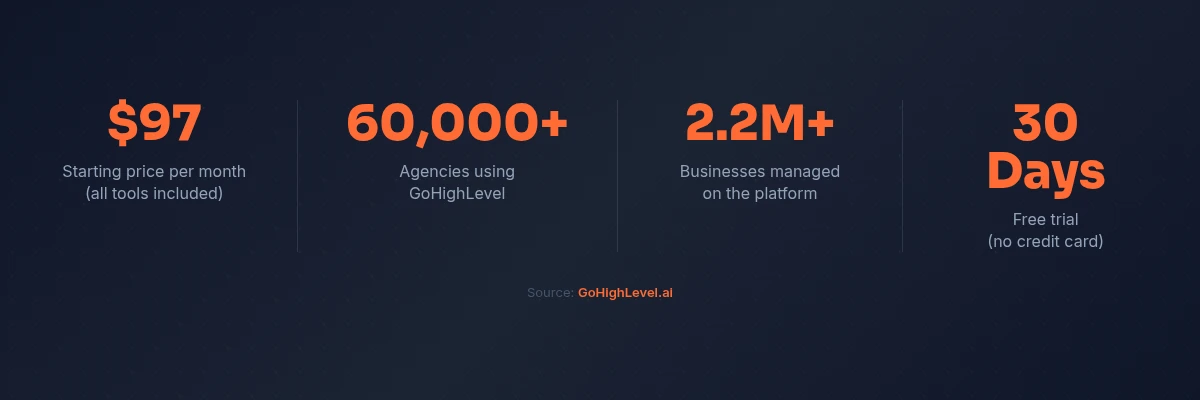
Join 2.2 million businesses already running on GoHighLevel
Who Should Use GoHighLevel SaaS Mode?
SaaS Mode is not for everyone. It is specifically designed for a particular type of agency owner who is ready to make a specific transition.
You are the right fit if:
- You already manage 3+ marketing clients and the retainer model feels like a ceiling
- You are spending money on GoHighLevel (or similar tools) for clients and want to monetize that investment
- You have a defined niche where you understand the pain points deeply
- You want predictable, recurring revenue that does not depend on billable hours
- You are comfortable with a slightly longer sales cycle in exchange for lifetime customer value
- You want to build something that has equity value - a client roster is an asset, a SaaS business is a company
You are probably not ready if:
- You have fewer than 3 active clients (build case studies first)
- You have not committed to a niche (generic SaaS is nearly impossible to sell)
- You are hoping SaaS Mode will replace all client work overnight (it takes 3-6 months to build MRR)
- Your agency's delivery quality is inconsistent (SaaS clients churn fast if the tool does not work for them)
The most successful GoHighLevel SaaS businesses are built by agency owners who already have proof that the platform works for their niche - and who are using SaaS Mode to productize what they have already proven.
Related Articles
EXTENDED FREE TRIAL
Start with 30 days free, not 14.
Use our partner link to get double the standard 14-day trial.
Start Your Free 30-Day Trial →Related Resources
- Visit the GoHighLevel SaaS mode details
- Visit the G2 GoHighLevel reviews
Frequently Asked Questions
What is the difference between GoHighLevel white label and SaaS Mode?
How do I set up GoHighLevel SaaS Mode?
How much does GoHighLevel SaaS Mode cost?
Can clients tell the platform is GoHighLevel?
How does GoHighLevel SaaS Mode compare to building your own SaaS from scratch?
Is GoHighLevel SaaS Mode worth the upgrade from the Pro plan?
Ashley Kemp is a digital entrepreneur and perpetual traveller. Switched from ClickFunnels to GoHighLevel years ago and never looked back. Writing about what actually works.
Was this article helpful?